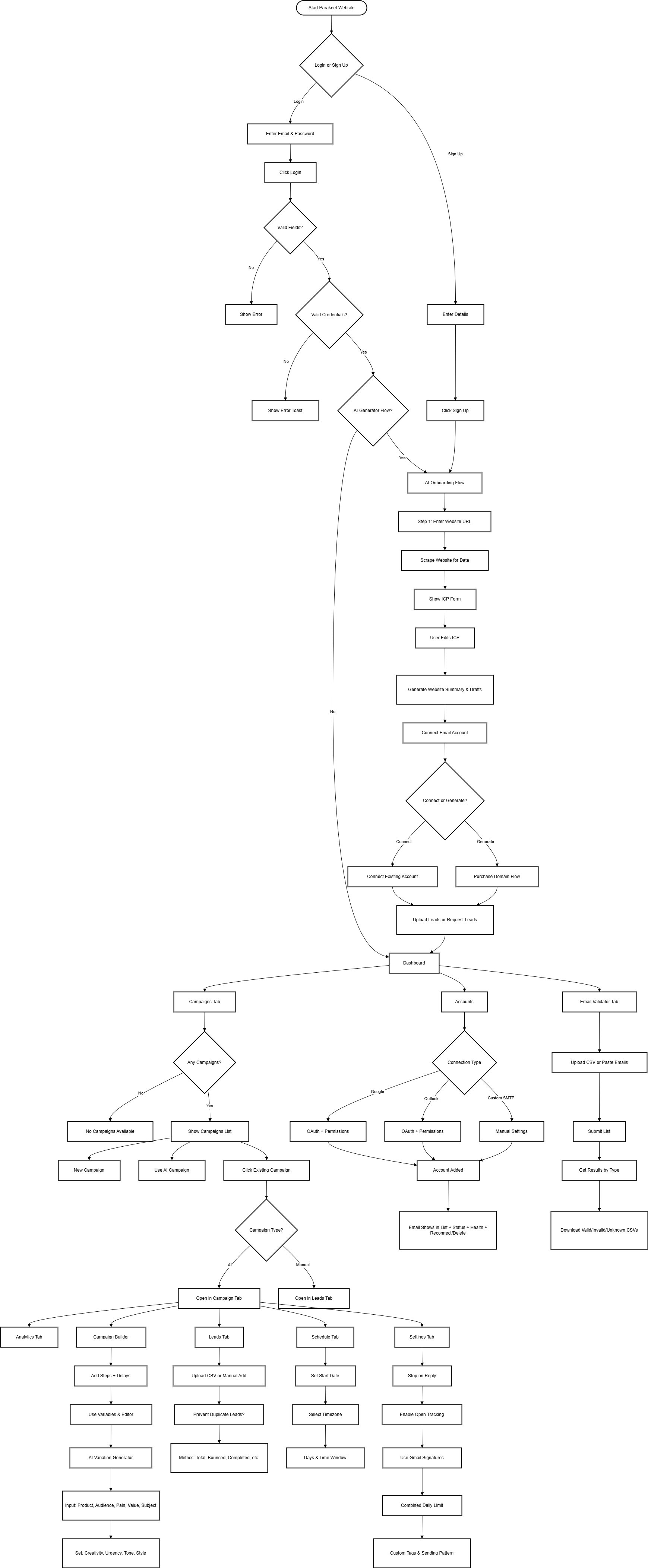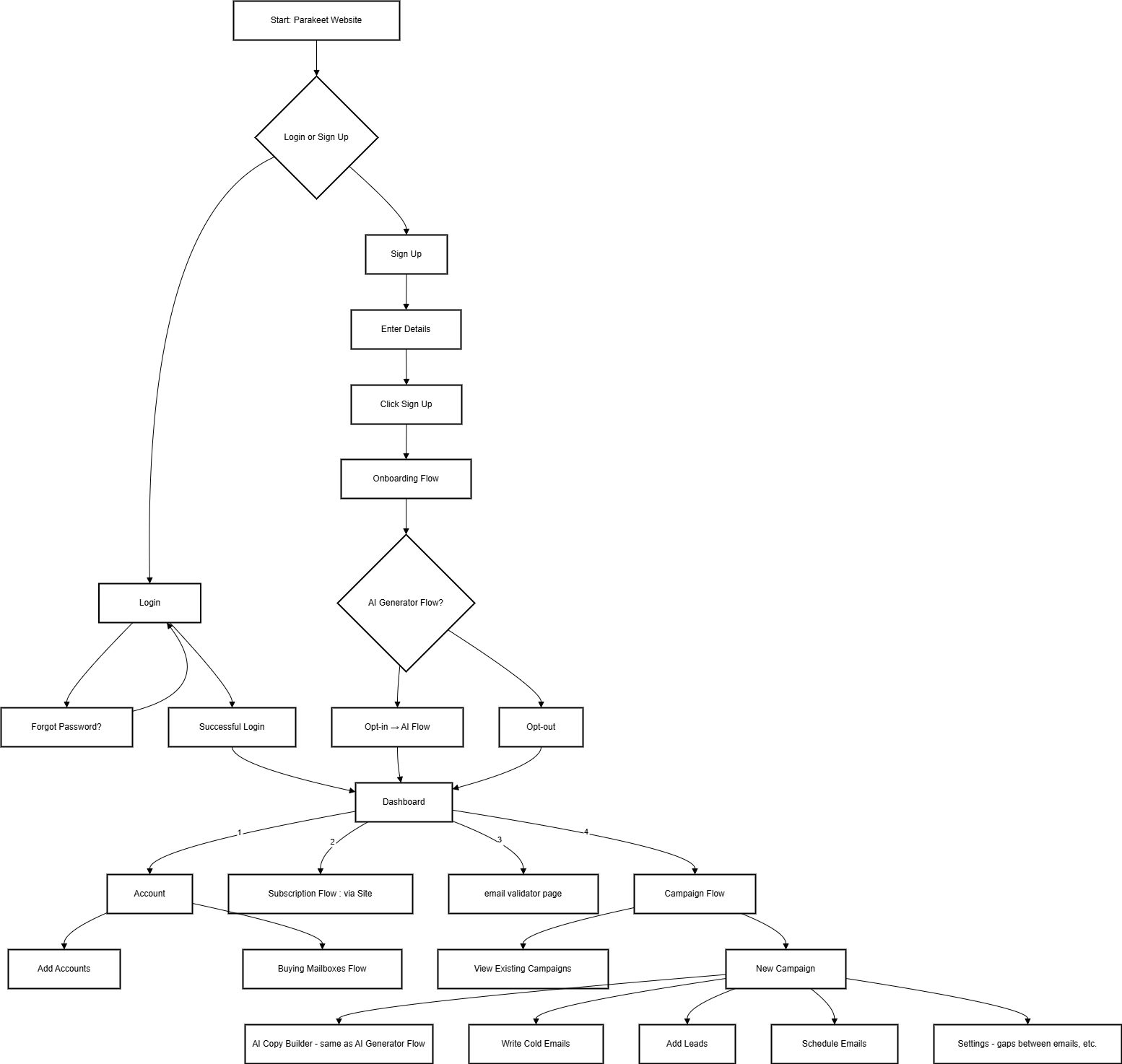

# User flows

# main flowchart diagram

<div drawio-diagram="36"><img src="https://internal-docs.parakeet.io/uploads/images/drawio/2025-06/KCblmeiNnQHHdDXb-drawing-3-1749733385.png" alt=""/></div>

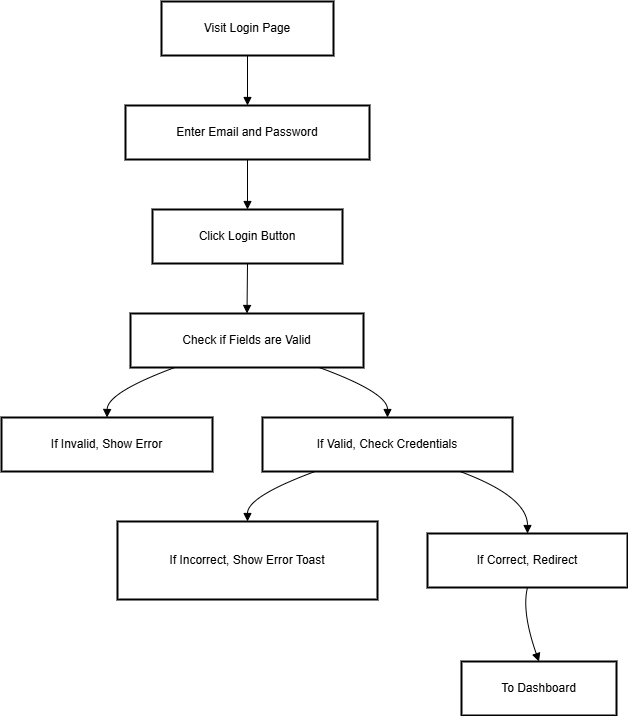
# Login Page

<div drawio-diagram="108"><img src="https://internal-docs.parakeet.io/uploads/images/drawio/2025-06/XG9XIZKSMWSZ3VIO-drawing-3-1750324608.png" alt=""/></div>

## 1. Login Flow

---

### Purpose

This flow allows existing users to securely access their Parakeet dashboard and campaign tools by logging into their accounts.

---

### Flow Steps

1. The user navigates to the login page:  
    `auth/login`
    
    [![image.png](https://internal-docs.parakeet.io/uploads/images/gallery/2025-06/scaled-1680-/rbgHR5dbpcey0KjE-image.png)](https://internal-docs.parakeet.io/uploads/images/gallery/2025-06/rbgHR5dbpcey0KjE-image.png)
2. The user is prompted to enter the following credentials:
    
    
    - Email address  
        `user@example.com`
    - Password  
        `********`
    - After entering valid credentials, the user clicks the **Login** button.
3. The system verifies the credentials:
    
    
    - If valid, the user is redirected to:  
        `/dashboard`
        
        [![image.png](https://internal-docs.parakeet.io/uploads/images/gallery/2025-06/scaled-1680-/snLZiUdfywP3Ia9h-image.png)](https://internal-docs.parakeet.io/uploads/images/gallery/2025-06/snLZiUdfywP3Ia9h-image.png)
    - If invalid, an error notification is displayed:  
        *"Invalid credentials. Please try again."*
        
        [![image.png](https://internal-docs.parakeet.io/uploads/images/gallery/2025-06/scaled-1680-/Tt1xhx25QTGDQsRb-image.png)](https://internal-docs.parakeet.io/uploads/images/gallery/2025-06/Tt1xhx25QTGDQsRb-image.png)
4. Depending on the context or prior user action, the user may be redirected to:
    
    
    - The Dashboard (if the user has an active account)

# Forget Password Flow

<div drawio-diagram="24"><img src="https://internal-docs.parakeet.io/uploads/images/drawio/2025-06/QngJ9zvaH4fWL60C-drawing-3-1749732879.png" alt=""/></div>

### Purpose

This flow enables users who have forgotten their credentials to securely reset their password and regain access to their account.

---

### Flow Steps

1. The user clicks on the **"Forgot Password"** link on the login page.
2. 
3. The user is redirected to the **Password Reset Request Page**:  
    `auth/forgot-password`
    
    ![](https://internal-docs.parakeet.io/loading.gif)
4. The user is prompted to enter the **email address** associated with their account.
5. Upon entering a valid email address, the user clicks the **"Send Password Reset Link"** button.
    
    
    - After submission, the button changes to indicate that a reset email has been sent.
    - Further inputs are disabled, and the user is instructed to check their email inbox.
        
        [![image.png](https://internal-docs.parakeet.io/uploads/images/gallery/2025-06/scaled-1680-/hTJ9wfjV5MU8T0o7-image.png)](https://internal-docs.parakeet.io/uploads/images/gallery/2025-06/hTJ9wfjV5MU8T0o7-image.png)
6. The user receives an email containing a **password reset link**.
    
    [![image.png](https://internal-docs.parakeet.io/uploads/images/gallery/2025-06/scaled-1680-/5wcIRbUm4xD8mf4H-image.png)](https://internal-docs.parakeet.io/uploads/images/gallery/2025-06/5wcIRbUm4xD8mf4H-image.png)
7. Clicking the reset link redirects the user to the following route:  
    `auth/forgot-password/{{user-specific-token}}`
8. The **Reset Password Page** includes the following fields:
    
    
    - **Email Address** (pre-filled)
    - **New Password**
    - **Confirm Password**  
        [![Screenshot 2025-06-12 182934.png](https://internal-docs.parakeet.io/uploads/images/gallery/2025-06/scaled-1680-/TRItHGep3LEaweeE-screenshot-2025-06-12-182934.png)](https://internal-docs.parakeet.io/uploads/images/gallery/2025-06/TRItHGep3LEaweeE-screenshot-2025-06-12-182934.png)
9. Once the user clicks the **"Reset Password"** button:
    
    
    - The system displays a message: *"Password changed successfully."*
    - The user is redirected back to the login page to authenticate using their new credentials.  
        [![image.png](https://internal-docs.parakeet.io/uploads/images/gallery/2025-06/scaled-1680-/WjLkwWUZ1s7D7OVy-image.png)](https://internal-docs.parakeet.io/uploads/images/gallery/2025-06/WjLkwWUZ1s7D7OVy-image.png)

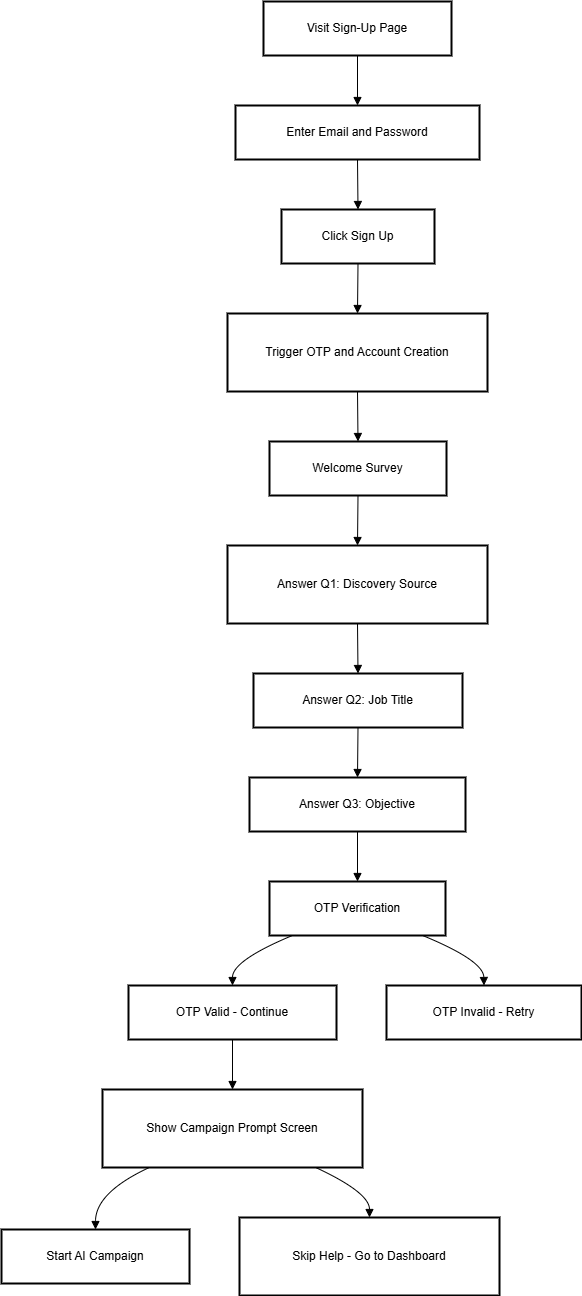
# Signup Page and Onboarding flow

<div drawio-diagram="39"><img src="https://internal-docs.parakeet.io/uploads/images/drawio/2025-06/J8JBnhh5W1l0KFwe-drawing-3-1750051388.png" alt=""/></div>

## 3. Sign-Up Flow

---

### Purpose

The sign-up flow registers new users and initiates a personalized onboarding sequence, guiding them toward setting up their first campaign effectively.

---

### Flow Steps

1. The user visits the **Sign-Up Page**:  
    `/signup`
    
    [![image.png](https://internal-docs.parakeet.io/uploads/images/gallery/2025-06/scaled-1680-/C3LFIl3H39wgoFG0-image.png)](https://internal-docs.parakeet.io/uploads/images/gallery/2025-06/C3LFIl3H39wgoFG0-image.png)
2. The user is prompted to enter:
    
    
    - A valid email address
    - A secure password
3. The user clicks on the **Sign Up** button.
4. System triggers the following actions:
    
    
    - New account creation
    - Automatic transition into the onboarding sequence

---

### Onboarding Sequence (Post Sign-Up)

#### Step 1: Welcome Survey

Purpose: To collect user context and personalize the experience.  
Questions include:

- **Q1: How did you find Parakeet?**  
    Options:
    
    
    - LinkedIn
    - Reddit
    - Twitter
    - Google Search
    - Friend/Colleague
    - Product Hunt
    - Other (Manual Entry)
        
        [![5Q7KRaVqPpYzp9nr-image.png](https://internal-docs.parakeet.io/uploads/images/gallery/2025-06/scaled-1680-/34E6tVckCZ8hJXWJ-5q7kravqppyzp9nr-image.png)](https://internal-docs.parakeet.io/uploads/images/gallery/2025-06/34E6tVckCZ8hJXWJ-5q7kravqppyzp9nr-image.png)
        
        [![image.png](https://internal-docs.parakeet.io/uploads/images/gallery/2025-06/scaled-1680-/jPBAKJDd87bUXwOP-image.png)](https://internal-docs.parakeet.io/uploads/images/gallery/2025-06/jPBAKJDd87bUXwOP-image.png)
- **Q2: What is your job title?**  
    Options:
    
    
    - CEO
    - Founder
    - VP of Sales
    - VP of Marketing
    - Marketing Director
    - Sales Manager
    - Marketing Manager
    - Growth Marketing Manager
    - Demand Generation Manager
    - Account Executive (AE)
    - Sales Development Representative (SDR)
    - Business Development Representative (BDR)
    - Other (Manual Entry)
        
        [![image.png](https://internal-docs.parakeet.io/uploads/images/gallery/2025-06/scaled-1680-/u3nQJRDxxlMWfW5B-image.png)](https://internal-docs.parakeet.io/uploads/images/gallery/2025-06/u3nQJRDxxlMWfW5B-image.png)![image.png](https://internal-docs.parakeet.io/uploads/images/gallery/2025-06/scaled-1680-/4UDAmbmwfj1TrSsu-image.png)
- **Q3: What are you looking to accomplish?**  
    Options:
    
    
    - Drive new sales opportunities
    - Nurture leads with drip campaigns
    - One-off email blasts
    - Not sure yet  
        [![image.png](https://internal-docs.parakeet.io/uploads/images/gallery/2025-06/scaled-1680-/Vup7QLGpmc8scYpM-image.png)](https://internal-docs.parakeet.io/uploads/images/gallery/2025-06/Vup7QLGpmc8scYpM-image.png)

---

#### Step 2: OTP Verification

- An OTP is sent to the email provided.
- If OTP is correct → proceed to next step
- If OTP is incorrect → option to retry or resend OTP
- Additionally the users are given an option to regenerate the OTP after 30 seconds [![image.png](https://internal-docs.parakeet.io/uploads/images/gallery/2025-06/scaled-1680-/kjqFtt1nUes28MxA-image.png)](https://internal-docs.parakeet.io/uploads/images/gallery/2025-06/kjqFtt1nUes28MxA-image.png)
- Email is sent out in the following format[![image.png](https://internal-docs.parakeet.io/uploads/images/gallery/2025-06/scaled-1680-/vekKB0InEoeE3lfL-image.png)](https://internal-docs.parakeet.io/uploads/images/gallery/2025-06/vekKB0InEoeE3lfL-image.png)

---

#### Step 3: Campaign Builder Prompt

User is greeted with a message encouraging them to start building their first campaign:

**"Building a campaign from scratch can be tough. This should make it easy for you. Ready?"**  
Options:

- **"Let’s Go"** → Launches the AI-powered campaign generation flow
- **"I’ll do it myself"** → Redirects to dashboard/homepage
    
    [![image.png](https://internal-docs.parakeet.io/uploads/images/gallery/2025-06/scaled-1680-/cBQB11YCuSX7LRKv-image.png)](https://internal-docs.parakeet.io/uploads/images/gallery/2025-06/cBQB11YCuSX7LRKv-image.png)

# AI Campaign Onboarding Flow

##  

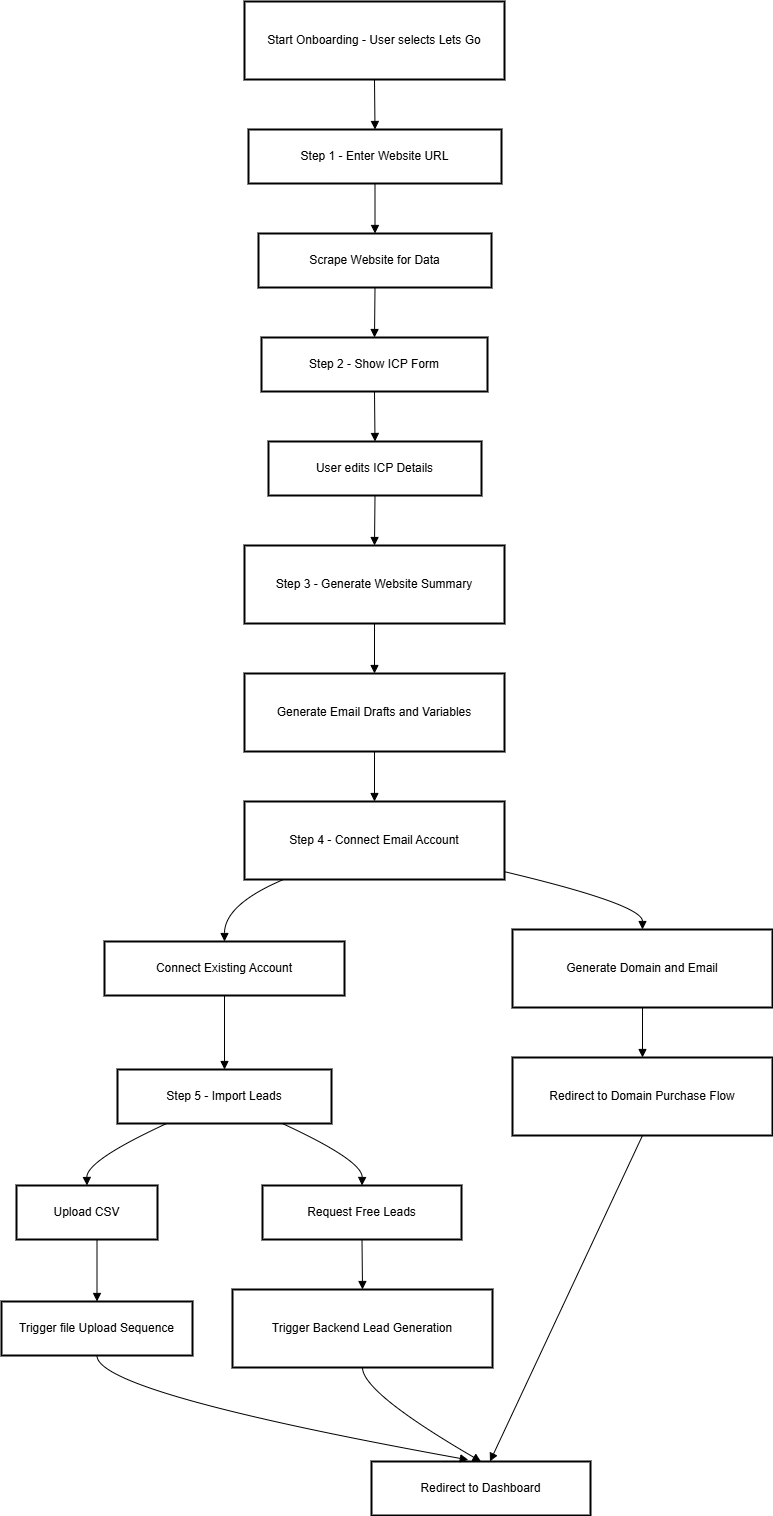
<div drawio-diagram="60"><img src="https://internal-docs.parakeet.io/uploads/images/drawio/2025-06/ME9zOEtjLAgQJSr2-drawing-3-1750170081.png" alt=""/></div>

## Purpose

This flow guides a new user through a 5-step AI-powered onboarding sequence to set up their first campaign using automated inputs.

---

### Overview of Steps

<div class="_tableContainer_16hzy_1" id="bkmrk-step-action-purpose-"><div class="_tableWrapper_16hzy_14 group flex w-fit flex-col-reverse" tabindex="-1"><table class="w-fit min-w-(--thread-content-width)" data-end="1366" data-start="510"><thead data-end="632" data-start="510"><tr data-end="632" data-start="510"><th data-col-size="sm" data-end="517" data-start="510">Step</th><th data-col-size="sm" data-end="557" data-start="517">Action</th><th data-col-size="md" data-end="632" data-start="557">Purpose</th></tr></thead><tbody data-end="1366" data-start="757"><tr data-end="878" data-start="757"><td data-col-size="sm" data-end="764" data-start="757">1</td><td data-col-size="sm" data-end="804" data-start="764">Input Website URL</td><td data-col-size="md" data-end="878" data-start="804">Extract business details automatically</td></tr><tr data-end="1000" data-start="879"><td data-col-size="sm" data-end="886" data-start="879">2</td><td data-col-size="sm" data-end="926" data-start="886">Fill ICP (Ideal Customer Profile) Form</td><td data-col-size="md" data-end="1000" data-start="926">Confirm/adjust scraped company data</td></tr><tr data-end="1122" data-start="1001"><td data-col-size="sm" data-end="1008" data-start="1001">3</td><td data-col-size="sm" data-end="1048" data-start="1008">Review AI Website Summary &amp; Campaign</td><td data-col-size="md" data-end="1122" data-start="1048">See AI-generated campaign draft and variables</td></tr><tr data-end="1244" data-start="1123"><td data-col-size="sm" data-end="1130" data-start="1123">4</td><td data-col-size="sm" data-end="1170" data-start="1130">Connect Email Accounts</td><td data-col-size="md" data-end="1244" data-start="1170">Either generate accounts or connect existing ones</td></tr><tr data-end="1366" data-start="1245"><td data-col-size="sm" data-end="1252" data-start="1245">5</td><td data-col-size="sm" data-end="1292" data-start="1252">Import Leads</td><td data-col-size="md" data-end="1366" data-start="1292">Upload a CSV of leads or request free leads for campaign execution</td></tr></tbody></table>

<div class="sticky end-(--thread-content-margin) h-0 self-end select-none"><div class="absolute end-0 flex items-end"><span class="" data-state="closed"><button class="bg-token-bg-primary hover:bg-token-bg-tertiary text-token-text-secondary my-1 rounded-sm p-1 transition-opacity group-[:not(:hover):not(:focus-within)]:pointer-events-none group-[:not(:hover):not(:focus-within)]:opacity-0"><svg class="icon" fill="currentColor" height="20" viewbox="0 0 20 20" width="20" xmlns="http://www.w3.org/2000/svg"><path d="M12.668 10.667C12.668 9.95614 12.668 9.46258 12.6367 9.0791C12.6137 8.79732 12.5758 8.60761 12.5244 8.46387L12.4688 8.33399C12.3148 8.03193 12.0803 7.77885 11.793 7.60254L11.666 7.53125C11.508 7.45087 11.2963 7.39395 10.9209 7.36328C10.5374 7.33197 10.0439 7.33203 9.33301 7.33203H6.5C5.78896 7.33203 5.29563 7.33195 4.91211 7.36328C4.63016 7.38632 4.44065 7.42413 4.29688 7.47559L4.16699 7.53125C3.86488 7.68518 3.61186 7.9196 3.43555 8.20703L3.36524 8.33399C3.28478 8.49198 3.22795 8.70352 3.19727 9.0791C3.16595 9.46259 3.16504 9.95611 3.16504 10.667V13.5C3.16504 14.211 3.16593 14.7044 3.19727 15.0879C3.22797 15.4636 3.28473 15.675 3.36524 15.833L3.43555 15.959C3.61186 16.2466 3.86474 16.4807 4.16699 16.6348L4.29688 16.6914C4.44063 16.7428 4.63025 16.7797 4.91211 16.8027C5.29563 16.8341 5.78896 16.835 6.5 16.835H9.33301C10.0439 16.835 10.5374 16.8341 10.9209 16.8027C11.2965 16.772 11.508 16.7152 11.666 16.6348L11.793 16.5645C12.0804 16.3881 12.3148 16.1351 12.4688 15.833L12.5244 15.7031C12.5759 15.5594 12.6137 15.3698 12.6367 15.0879C12.6681 14.7044 12.668 14.211 12.668 13.5V10.667ZM13.998 12.665C14.4528 12.6634 14.8011 12.6602 15.0879 12.6367C15.4635 12.606 15.675 12.5492 15.833 12.4688L15.959 12.3975C16.2466 12.2211 16.4808 11.9682 16.6348 11.666L16.6914 11.5361C16.7428 11.3924 16.7797 11.2026 16.8027 10.9209C16.8341 10.5374 16.835 10.0439 16.835 9.33301V6.5C16.835 5.78896 16.8341 5.29563 16.8027 4.91211C16.7797 4.63025 16.7428 4.44063 16.6914 4.29688L16.6348 4.16699C16.4807 3.86474 16.2466 3.61186 15.959 3.43555L15.833 3.36524C15.675 3.28473 15.4636 3.22797 15.0879 3.19727C14.7044 3.16593 14.211 3.16504 13.5 3.16504H10.667C9.9561 3.16504 9.46259 3.16595 9.0791 3.19727C8.79739 3.22028 8.6076 3.2572 8.46387 3.30859L8.33399 3.36524C8.03176 3.51923 7.77886 3.75343 7.60254 4.04102L7.53125 4.16699C7.4508 4.32498 7.39397 4.53655 7.36328 4.91211C7.33985 5.19893 7.33562 5.54719 7.33399 6.00195H9.33301C10.022 6.00195 10.5791 6.00131 11.0293 6.03809C11.4873 6.07551 11.8937 6.15471 12.2705 6.34668L12.4883 6.46875C12.984 6.7728 13.3878 7.20854 13.6533 7.72949L13.7197 7.87207C13.8642 8.20859 13.9292 8.56974 13.9619 8.9707C13.9987 9.42092 13.998 9.97799 13.998 10.667V12.665ZM18.165 9.33301C18.165 10.022 18.1657 10.5791 18.1289 11.0293C18.0961 11.4302 18.0311 11.7914 17.8867 12.1279L17.8203 12.2705C17.5549 12.7914 17.1509 13.2272 16.6553 13.5313L16.4365 13.6533C16.0599 13.8452 15.6541 13.9245 15.1963 13.9619C14.8593 13.9895 14.4624 13.9935 13.9951 13.9951C13.9935 14.4624 13.9895 14.8593 13.9619 15.1963C13.9292 15.597 13.864 15.9576 13.7197 16.2939L13.6533 16.4365C13.3878 16.9576 12.9841 17.3941 12.4883 17.6982L12.2705 17.8203C11.8937 18.0123 11.4873 18.0915 11.0293 18.1289C10.5791 18.1657 10.022 18.165 9.33301 18.165H6.5C5.81091 18.165 5.25395 18.1657 4.80371 18.1289C4.40306 18.0962 4.04235 18.031 3.70606 17.8867L3.56348 17.8203C3.04244 17.5548 2.60585 17.151 2.30176 16.6553L2.17969 16.4365C1.98788 16.0599 1.90851 15.6541 1.87109 15.1963C1.83431 14.746 1.83496 14.1891 1.83496 13.5V10.667C1.83496 9.978 1.83432 9.42091 1.87109 8.9707C1.90851 8.5127 1.98772 8.10625 2.17969 7.72949L2.30176 7.51172C2.60586 7.0159 3.04236 6.6122 3.56348 6.34668L3.70606 6.28027C4.04237 6.136 4.40303 6.07083 4.80371 6.03809C5.14051 6.01057 5.53708 6.00551 6.00391 6.00391C6.00551 5.53708 6.01057 5.14051 6.03809 4.80371C6.0755 4.34588 6.15483 3.94012 6.34668 3.56348L6.46875 3.34473C6.77282 2.84912 7.20856 2.44514 7.72949 2.17969L7.87207 2.11328C8.20855 1.96886 8.56979 1.90385 8.9707 1.87109C9.42091 1.83432 9.978 1.83496 10.667 1.83496H13.5C14.1891 1.83496 14.746 1.83431 15.1963 1.87109C15.6541 1.90851 16.0599 1.98788 16.4365 2.17969L16.6553 2.30176C17.151 2.60585 17.5548 3.04244 17.8203 3.56348L17.8867 3.70606C18.031 4.04235 18.0962 4.40306 18.1289 4.80371C18.1657 5.25395 18.165 5.81091 18.165 6.5V9.33301Z"></path></svg></button></span></div></div></div></div>---

### Step-by-Step Flow

#### Step 1: Enter Website URL

- The user inputs their website (e.g., `example.com`).
- This domain is used to scrape relevant business and ICP details.

**Screenshot Placeholder**

---

#### Step 2: ICP Form (Auto-Filled)

- Displayed after scraping the domain data
- User can review or edit the fields:
    
    
    - Industry
    - Target Audience
    - Company Size (⚠️ Currently allows multiple selections — should be single-select)

**Screenshot Placeholder**

[![image.png](https://internal-docs.parakeet.io/uploads/images/gallery/2025-06/scaled-1680-/YnSnQndY6zqpoeUK-image.png)](https://internal-docs.parakeet.io/uploads/images/gallery/2025-06/YnSnQndY6zqpoeUK-image.png)

---

#### Step 3: AI Website Summary &amp; Email Campaign

- Displays:
    
    
    - Website summary (based on scraping)
    - A 3-step cold email sequence with subject lines and editable body
    - Available merge variables like `{FIRST_NAME}`, `{COMPANY_NAME}`, etc

**Screenshot Placeholder**

[![image.png](https://internal-docs.parakeet.io/uploads/images/gallery/2025-06/scaled-1680-/w7gUzsn71fofsKJE-image.png)](https://internal-docs.parakeet.io/uploads/images/gallery/2025-06/w7gUzsn71fofsKJE-image.png)

---

#### Step 4: Connect Email Account

- User is prompted to either:
    
    
    - **Generate Domains &amp; Email Accounts** (redirects to domain purchase flow)
    - **Connect Existing Accounts** (OAuth or manual configuration)

**Screenshot Placeholder**

[![image.png](https://internal-docs.parakeet.io/uploads/images/gallery/2025-06/scaled-1680-/uTjdJWvTS1XVXe5R-image.png)](https://internal-docs.parakeet.io/uploads/images/gallery/2025-06/uTjdJWvTS1XVXe5R-image.png)

---

#### Step 5: Import Leads

- Options available:
    
    
    - Upload lead list via CSV
    - Request 200 free leads
- This step concludes the flow and redirects the user to the dashboard.

**Screenshot Placeholder**

[![image.png](https://internal-docs.parakeet.io/uploads/images/gallery/2025-06/scaled-1680-/TLVVPP9mMe8hX7kt-image.png)](https://internal-docs.parakeet.io/uploads/images/gallery/2025-06/TLVVPP9mMe8hX7kt-image.png)

1. - - -

# Email Validator

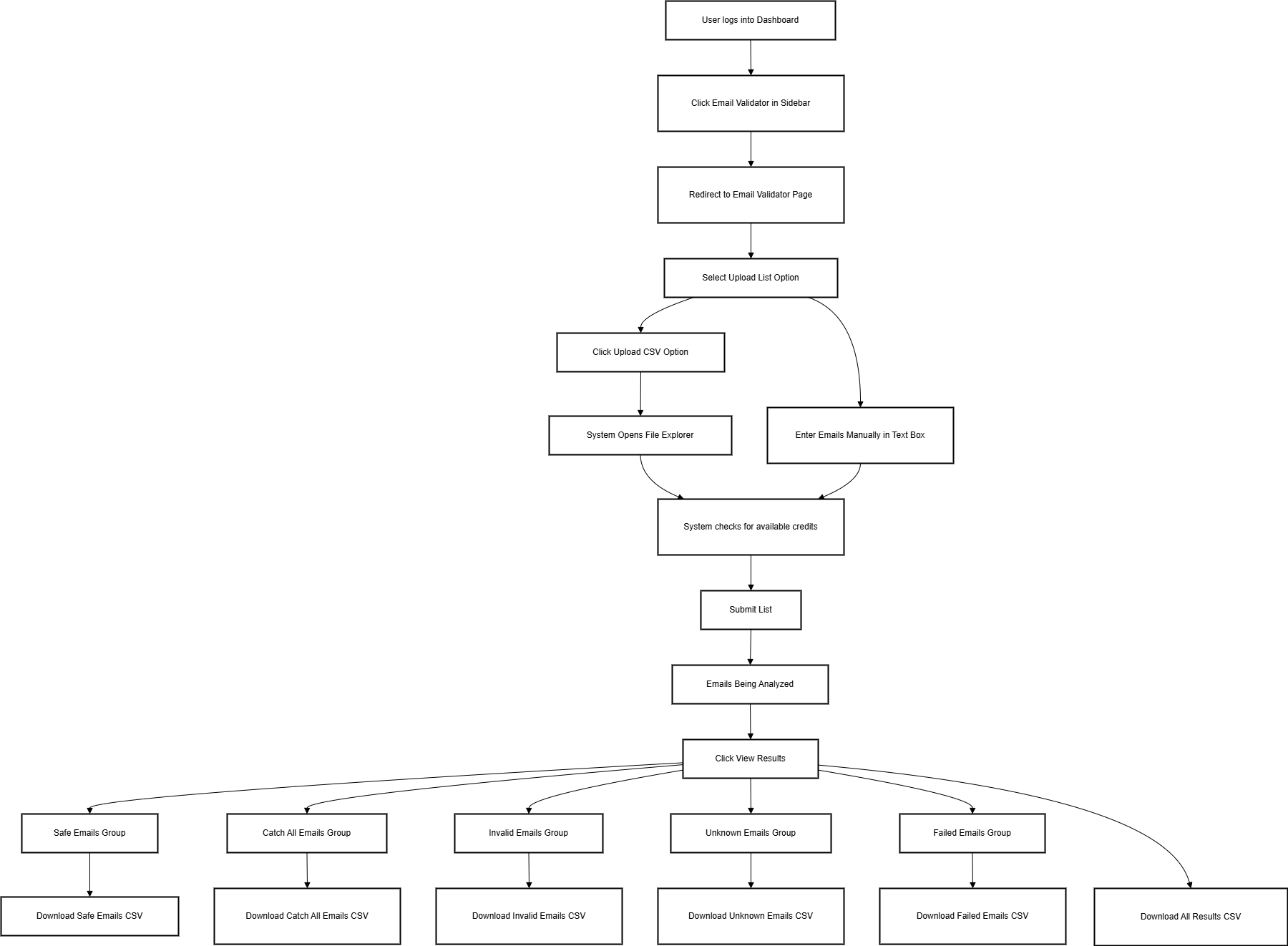
<div drawio-diagram="61"><img src="https://internal-docs.parakeet.io/uploads/images/drawio/2025-06/uom2FdPBNN1HGC1y-drawing-3-1750174562.png" alt=""/></div>

### Flow Overview

This document outlines the complete user journey for interacting with the **Email Validator** feature in the Parakeet app, including:

- Bulk email upload
- Email validation
- Viewing categorized results
- Exporting results

---

### Navigation Path

1. **Login and Dashboard Access**
    
    
    - User logs in and lands on a minimal dashboard.
    - Dashboard acts as a navigation hub.
    
    **\[Insert Screenshot Here: Dashboard with Email Validator in left nav\]**
2. **Open Email Validator**
    
    
    - User clicks **"Email Validator"** in the left-hand menu.
    - Redirects to:  
        `https://app.parakeet.io/email-validator`
    
    [![image.png](https://internal-docs.parakeet.io/uploads/images/gallery/2025-06/scaled-1680-/zrPHq92QYUyU6zkc-image.png)](https://internal-docs.parakeet.io/uploads/images/gallery/2025-06/zrPHq92QYUyU6zkc-image.png)

---

### Email Validation – Two Modes

On the Email Validator page, users see two options:

1. **Search**
    
    
    - For **single email** validation.
    - **multiple Emails** can be added but one in each line
2. **Upload List (Primary Use Case)**
    
    
    - For **bulk validation** via .csv upload or manual entry.

---

### Upload List Flow

[![image.png](https://internal-docs.parakeet.io/uploads/images/gallery/2025-06/scaled-1680-/FCNIqUYTx2DpZyeX-image.png)](https://internal-docs.parakeet.io/uploads/images/gallery/2025-06/FCNIqUYTx2DpZyeX-image.png)

#### 1. Input Requirements

- User **must enter a List Name** (required field).
- User can choose either:
    
    
    - **Upload** a `.csv` file with emails
    - **Manually paste** emails into a textbox

#### 2. Trade Balance Check

- System checks **available credits** before submission (if credit system is enabled).

#### 3. Analyzing Stage

- After clicking submit, a popup displays progress:
    
    <div class="contain-inline-size rounded-2xl relative bg-token-sidebar-surface-primary"><div class="sticky top-9">  
    </div><div class="overflow-y-auto p-4" dir="ltr">`Verified <span class="hljs-number">12</span> emails <span class="hljs-keyword">out</span> of <span class="hljs-number">12</span> <span class="hljs-keyword">in</span> <span class="hljs-number">2</span> minutes.`</div></div>[![image.png](https://internal-docs.parakeet.io/uploads/images/gallery/2025-06/scaled-1680-/AfAxeOGpWuKEQrOM-image.png)](https://internal-docs.parakeet.io/uploads/images/gallery/2025-06/AfAxeOGpWuKEQrOM-image.png)

---

### Results and Email Status

#### 1. Viewing Results

- User clicks **"View Results"** after analysis completes.
- The page refreshes with categorized results.
    
    [![image.png](https://internal-docs.parakeet.io/uploads/images/gallery/2025-06/scaled-1680-/Lwna3IO4phZBoMUu-image.png)](https://internal-docs.parakeet.io/uploads/images/gallery/2025-06/Lwna3IO4phZBoMUu-image.png)

#### 2. Status Categories

Results are grouped into dropdowns:

- ✅ **Safe** – Valid and safe
- ⚠️ **Catch All** – Domain accepts all, unsure validity
- ❌ **Invalid** – Email is invalid
- ❓ **Unknown** – Could not verify
- 🚫 **Failed** – Technical failure

---

### CSV Downloads

Users can export data via:

- **Single CSV** – All results combined
- **Filtered CSV** – Individual groups (e.g., only "Catch All")

# Accounts page

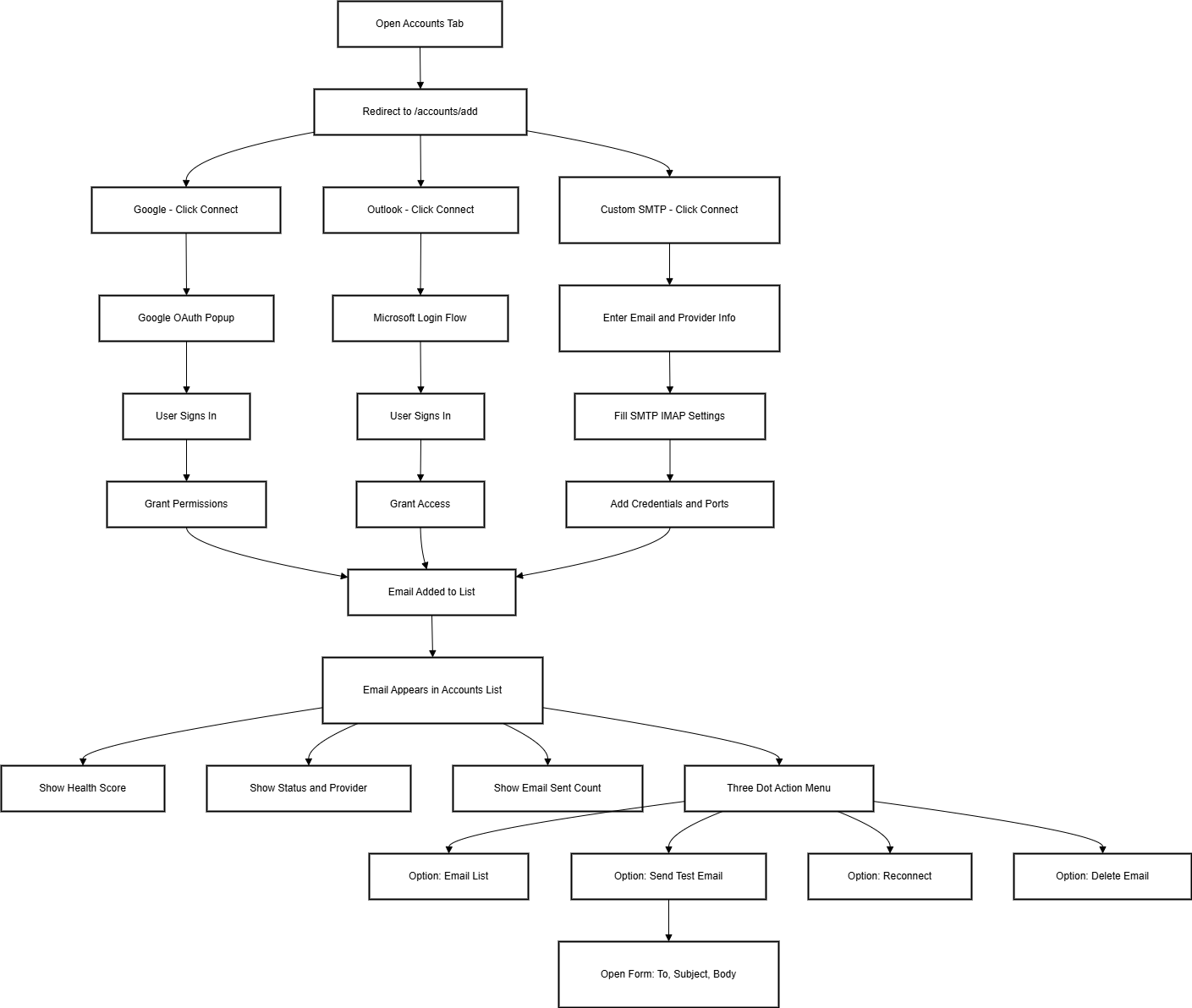
<div drawio-diagram="69"><img src="https://internal-docs.parakeet.io/uploads/images/drawio/2025-06/sgBQovfROYnnP66R-drawing-3-1750180076.png" alt=""/></div>

## Purpose

This flow allows users to **connect or purchase sending email accounts** for use in cold outreach. It supports Gmail, Outlook, and custom IMAP/SMTP providers. Once connected, all accounts appear in a centralized list with metadata and action options.

---

## 1. Navigation Entry Point

**Navigation:**  
`https://app.chat.io/accounts/add`

- User logs in and clicks on the **"Accounts"** tab from the sidebar.

[![image.png](https://internal-docs.parakeet.io/uploads/images/gallery/2025-06/scaled-1680-/OYh7cvPeqdyTefsE-image.png)](https://internal-docs.parakeet.io/uploads/images/gallery/2025-06/OYh7cvPeqdyTefsE-image.png)

---

## 2. Email Connection Options

Upon accessing the page, users see options to **add a new email account** using one of three methods:

### Option 1: Connect Existing Email

User clicks **"Connect Email"**, then selects one of the following providers:

[![image.png](https://internal-docs.parakeet.io/uploads/images/gallery/2025-06/scaled-1680-/RPgn1Vc8hh1uE2tG-image.png)](https://internal-docs.parakeet.io/uploads/images/gallery/2025-06/RPgn1Vc8hh1uE2tG-image.png)

---

### ➤ Google (Gmail)

- Opens a **Google OAuth pop-up**:  
    “Connect your Gmail account”
- User signs in via Google login.
- Permissions are granted through the standard Google OAuth flow.

[![image.png](https://internal-docs.parakeet.io/uploads/images/gallery/2025-06/scaled-1680-/BBD06aKi7HfQvbiW-image.png)](https://internal-docs.parakeet.io/uploads/images/gallery/2025-06/BBD06aKi7HfQvbiW-image.png)

---

### ➤ Outlook (Microsoft 365)

- Redirects user to `https://login.microsoftonline.com`
- User logs in with Microsoft credentials.
- OAuth-based access approval is completed.

[![image.png](https://internal-docs.parakeet.io/uploads/images/gallery/2025-06/scaled-1680-/mChU1tfWzVxDaiFN-image.png)](https://internal-docs.parakeet.io/uploads/images/gallery/2025-06/mChU1tfWzVxDaiFN-image.png)

---

### ➤ Custom Provider (IMAP + SMTP)

User is prompted to manually enter the following:

- Email address
- Provider name
- Incoming mail (IMAP) server
- Outgoing mail (SMTP) server
- Ports and encryption type (SSL/TLS)
- Credentials (Username and Password, if applicable)

[![image.png](https://internal-docs.parakeet.io/uploads/images/gallery/2025-06/scaled-1680-/juZ9DfQe5s6e5NC3-image.png)](https://internal-docs.parakeet.io/uploads/images/gallery/2025-06/juZ9DfQe5s6e5NC3-image.png)

---

### Option 2: Buy New Email

Users may choose to **purchase a new mailbox** from within the platform. This typically includes:

- Automated domain setup
- SMTP configuration handled internally

**\[insert the link to buy doimans flow\]**

---

## 3. Post-Connection: Email Appears in List

After successful connection or purchase, the new email is added to the **Accounts list**.

Each row in the list displays:

- Email Address
- Provider
- Health Score
- Total Emails Sent
- Status (Connected / Not Connected)
- Action Menu (3 Dots)

[![image.png](https://internal-docs.parakeet.io/uploads/images/gallery/2025-06/scaled-1680-/KyKadVMtEzICxDcW-image.png)](https://internal-docs.parakeet.io/uploads/images/gallery/2025-06/KyKadVMtEzICxDcW-image.png)

---

## 4. Health and Status Indicators

Each connected email shows:

- **Health Score** (numerical or colored scale)
- **Status**: e.g., "Connected", "Disconnected", or "Reconnect Required"
- **Provider**: Google, Outlook, or Custom
- **Emails Sent**: Total number of emails sent using that address

[![image.png](https://internal-docs.parakeet.io/uploads/images/gallery/2025-06/scaled-1680-/GSvB4c6LLD0KvruC-image.png)](https://internal-docs.parakeet.io/uploads/images/gallery/2025-06/GSvB4c6LLD0KvruC-image.png)

### Email Health Score &amp; Deliverability Dashboard

Once an email is connected, it’s displayed in the **Accounts tab** with additional metrics, including:

- **Email Address**
- **Provider**
- **Health Score** (0–100)
- **Total Emails Sent**
- **Status** (Connected / Needs Reconnect)
- **3-dot menu** (actions)

Clicking on the **Health Score** opens the **Email Deliverability Dashboard**, which evaluates the domain’s ability to successfully deliver emails based on the following metrics:

<div class="_tableContainer_16hzy_1" id="bkmrk-metric-score-weight-"><div class="_tableWrapper_16hzy_14 group flex w-fit flex-col-reverse" tabindex="-1"><table class="w-fit min-w-(--thread-content-width)" data-end="1364" data-start="707"><thead data-end="766" data-start="707"><tr data-end="766" data-start="707"><th data-col-size="sm" data-end="729" data-start="707">Metric</th><th data-col-size="sm" data-end="744" data-start="729">Score Weight</th><th data-col-size="sm" data-end="766" data-start="744">Status Description</th></tr></thead><tbody data-end="1364" data-start="828"><tr data-end="894" data-start="828"><td data-col-size="sm" data-end="851" data-start="828">**Reply Rate**</td><td data-col-size="sm" data-end="866" data-start="851">15 pts</td><td data-col-size="sm" data-end="894" data-start="866">% of recipients replying</td></tr><tr data-end="961" data-start="895"><td data-col-size="sm" data-end="918" data-start="895">**Bounce Rate**</td><td data-col-size="sm" data-end="933" data-start="918">20 pts</td><td data-col-size="sm" data-end="961" data-start="933">% of emails that bounced</td></tr><tr data-end="1033" data-start="962"><td data-col-size="sm" data-end="985" data-start="962">**DNS BL**</td><td data-col-size="sm" data-end="1000" data-start="985">10 pts</td><td data-col-size="sm" data-end="1033" data-start="1000">Whether domain is blacklisted</td></tr><tr data-end="1103" data-start="1034"><td data-col-size="sm" data-end="1057" data-start="1034">**MX Record**</td><td data-col-size="sm" data-end="1072" data-start="1057">4 pts</td><td data-col-size="sm" data-end="1103" data-start="1072">Mail exchange record status</td></tr><tr data-end="1169" data-start="1104"><td data-col-size="sm" data-end="1127" data-start="1104">**SPF Record**</td><td data-col-size="sm" data-end="1142" data-start="1127">–</td><td data-col-size="sm" data-end="1169" data-start="1142">Authenticates sender IP</td></tr><tr data-end="1232" data-start="1170"><td data-col-size="sm" data-end="1193" data-start="1170">**DKIM**</td><td data-col-size="sm" data-end="1208" data-start="1193">4 pts</td><td data-col-size="sm" data-end="1232" data-start="1208">Email signing active</td></tr><tr data-end="1299" data-start="1233"><td data-col-size="sm" data-end="1256" data-start="1233">**DMARC**</td><td data-col-size="sm" data-end="1271" data-start="1256">–</td><td data-col-size="sm" data-end="1299" data-start="1271">Alignment &amp; policy check</td></tr><tr data-end="1364" data-start="1300"><td data-col-size="sm" data-end="1327" data-start="1300">**Deliverability Score**</td><td data-col-size="sm" data-end="1338" data-start="1327">35 pts</td><td data-col-size="sm" data-end="1364" data-start="1338">Combined score summary</td></tr></tbody></table>

<div class="sticky end-(--thread-content-margin) h-0 self-end select-none"><div class="absolute end-0 flex items-end"><span class="" data-state="closed"><button class="bg-token-bg-primary hover:bg-token-bg-tertiary text-token-text-secondary my-1 rounded-sm p-1 transition-opacity group-[:not(:hover):not(:focus-within)]:pointer-events-none group-[:not(:hover):not(:focus-within)]:opacity-0"><svg class="icon" fill="currentColor" height="20" viewbox="0 0 20 20" width="20" xmlns="http://www.w3.org/2000/svg"><path d="M12.668 10.667C12.668 9.95614 12.668 9.46258 12.6367 9.0791C12.6137 8.79732 12.5758 8.60761 12.5244 8.46387L12.4688 8.33399C12.3148 8.03193 12.0803 7.77885 11.793 7.60254L11.666 7.53125C11.508 7.45087 11.2963 7.39395 10.9209 7.36328C10.5374 7.33197 10.0439 7.33203 9.33301 7.33203H6.5C5.78896 7.33203 5.29563 7.33195 4.91211 7.36328C4.63016 7.38632 4.44065 7.42413 4.29688 7.47559L4.16699 7.53125C3.86488 7.68518 3.61186 7.9196 3.43555 8.20703L3.36524 8.33399C3.28478 8.49198 3.22795 8.70352 3.19727 9.0791C3.16595 9.46259 3.16504 9.95611 3.16504 10.667V13.5C3.16504 14.211 3.16593 14.7044 3.19727 15.0879C3.22797 15.4636 3.28473 15.675 3.36524 15.833L3.43555 15.959C3.61186 16.2466 3.86474 16.4807 4.16699 16.6348L4.29688 16.6914C4.44063 16.7428 4.63025 16.7797 4.91211 16.8027C5.29563 16.8341 5.78896 16.835 6.5 16.835H9.33301C10.0439 16.835 10.5374 16.8341 10.9209 16.8027C11.2965 16.772 11.508 16.7152 11.666 16.6348L11.793 16.5645C12.0804 16.3881 12.3148 16.1351 12.4688 15.833L12.5244 15.7031C12.5759 15.5594 12.6137 15.3698 12.6367 15.0879C12.6681 14.7044 12.668 14.211 12.668 13.5V10.667ZM13.998 12.665C14.4528 12.6634 14.8011 12.6602 15.0879 12.6367C15.4635 12.606 15.675 12.5492 15.833 12.4688L15.959 12.3975C16.2466 12.2211 16.4808 11.9682 16.6348 11.666L16.6914 11.5361C16.7428 11.3924 16.7797 11.2026 16.8027 10.9209C16.8341 10.5374 16.835 10.0439 16.835 9.33301V6.5C16.835 5.78896 16.8341 5.29563 16.8027 4.91211C16.7797 4.63025 16.7428 4.44063 16.6914 4.29688L16.6348 4.16699C16.4807 3.86474 16.2466 3.61186 15.959 3.43555L15.833 3.36524C15.675 3.28473 15.4636 3.22797 15.0879 3.19727C14.7044 3.16593 14.211 3.16504 13.5 3.16504H10.667C9.9561 3.16504 9.46259 3.16595 9.0791 3.19727C8.79739 3.22028 8.6076 3.2572 8.46387 3.30859L8.33399 3.36524C8.03176 3.51923 7.77886 3.75343 7.60254 4.04102L7.53125 4.16699C7.4508 4.32498 7.39397 4.53655 7.36328 4.91211C7.33985 5.19893 7.33562 5.54719 7.33399 6.00195H9.33301C10.022 6.00195 10.5791 6.00131 11.0293 6.03809C11.4873 6.07551 11.8937 6.15471 12.2705 6.34668L12.4883 6.46875C12.984 6.7728 13.3878 7.20854 13.6533 7.72949L13.7197 7.87207C13.8642 8.20859 13.9292 8.56974 13.9619 8.9707C13.9987 9.42092 13.998 9.97799 13.998 10.667V12.665ZM18.165 9.33301C18.165 10.022 18.1657 10.5791 18.1289 11.0293C18.0961 11.4302 18.0311 11.7914 17.8867 12.1279L17.8203 12.2705C17.5549 12.7914 17.1509 13.2272 16.6553 13.5313L16.4365 13.6533C16.0599 13.8452 15.6541 13.9245 15.1963 13.9619C14.8593 13.9895 14.4624 13.9935 13.9951 13.9951C13.9935 14.4624 13.9895 14.8593 13.9619 15.1963C13.9292 15.597 13.864 15.9576 13.7197 16.2939L13.6533 16.4365C13.3878 16.9576 12.9841 17.3941 12.4883 17.6982L12.2705 17.8203C11.8937 18.0123 11.4873 18.0915 11.0293 18.1289C10.5791 18.1657 10.022 18.165 9.33301 18.165H6.5C5.81091 18.165 5.25395 18.1657 4.80371 18.1289C4.40306 18.0962 4.04235 18.031 3.70606 17.8867L3.56348 17.8203C3.04244 17.5548 2.60585 17.151 2.30176 16.6553L2.17969 16.4365C1.98788 16.0599 1.90851 15.6541 1.87109 15.1963C1.83431 14.746 1.83496 14.1891 1.83496 13.5V10.667C1.83496 9.978 1.83432 9.42091 1.87109 8.9707C1.90851 8.5127 1.98772 8.10625 2.17969 7.72949L2.30176 7.51172C2.60586 7.0159 3.04236 6.6122 3.56348 6.34668L3.70606 6.28027C4.04237 6.136 4.40303 6.07083 4.80371 6.03809C5.14051 6.01057 5.53708 6.00551 6.00391 6.00391C6.00551 5.53708 6.01057 5.14051 6.03809 4.80371C6.0755 4.34588 6.15483 3.94012 6.34668 3.56348L6.46875 3.34473C6.77282 2.84912 7.20856 2.44514 7.72949 2.17969L7.87207 2.11328C8.20855 1.96886 8.56979 1.90385 8.9707 1.87109C9.42091 1.83432 9.978 1.83496 10.667 1.83496H13.5C14.1891 1.83496 14.746 1.83431 15.1963 1.87109C15.6541 1.90851 16.0599 1.98788 16.4365 2.17969L16.6553 2.30176C17.151 2.60585 17.5548 3.04244 17.8203 3.56348L17.8867 3.70606C18.031 4.04235 18.0962 4.40306 18.1289 4.80371C18.1657 5.25395 18.165 5.81091 18.165 6.5V9.33301Z"></path></svg></button></span></div></div></div></div>Each row is color-coded:

- ✅ Green: Active/Valid
- ⚠️ Yellow: Missing or incomplete
- ❌ Red: Critical (e.g., blacklisted)\\

[![image.png](https://internal-docs.parakeet.io/uploads/images/gallery/2025-06/scaled-1680-/JCozBmzbO8hkjoUq-image.png)](https://internal-docs.parakeet.io/uploads/images/gallery/2025-06/JCozBmzbO8hkjoUq-image.png)

---

## 5. Actions Menu (⋮)

Clicking the **three-dot menu** on each email opens four options:

[![image.png](https://internal-docs.parakeet.io/uploads/images/gallery/2025-06/scaled-1680-/R4fh1BzM1tkgIq0C-image.png)](https://internal-docs.parakeet.io/uploads/images/gallery/2025-06/R4fh1BzM1tkgIq0C-image.png)

1. **Email List** – View campaigns or mail associated with the account
    
    [![image.png](https://internal-docs.parakeet.io/uploads/images/gallery/2025-06/scaled-1680-/mB1phBOidN1sVvkU-image.png)](https://internal-docs.parakeet.io/uploads/images/gallery/2025-06/mB1phBOidN1sVvkU-image.png)
2. **Send Email** – Opens sidebar form with:
    
    
    - To
    - Subject
    - Email Body
        
        [![image.png](https://internal-docs.parakeet.io/uploads/images/gallery/2025-06/scaled-1680-/ObxMDA1RyouY4si7-image.png)](https://internal-docs.parakeet.io/uploads/images/gallery/2025-06/ObxMDA1RyouY4si7-image.png)
3. **Reconnect** – Re-runs the provider connection flow
4. **Delete** – Permanently removes the email from your account

# Purchase flow

# Purchase flows (For Domain and Emails)

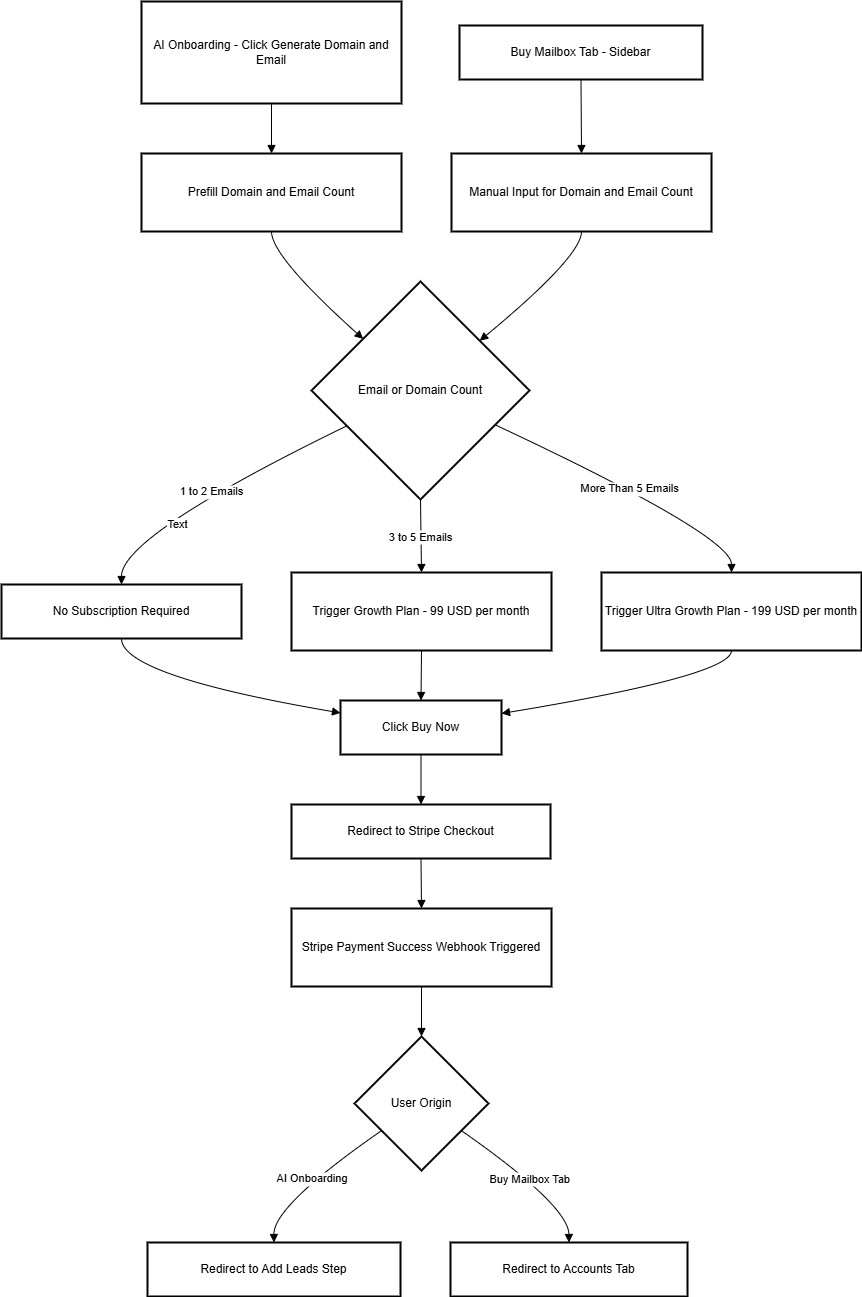
<div drawio-diagram="85"><img src="https://internal-docs.parakeet.io/uploads/images/drawio/2025-06/QEVymnqi8hnBq5U8-drawing-3-1750261855.png" alt=""/></div>

### urpose

This flow outlines how users can buy email mailboxes through two different paths in the Parakeet app—either via the **AI Onboarding Flow** or the **Buy Mailbox Tab** from the sidebar. Based on the number of mailboxes requested, a relevant **Stripe subscription tier** is triggered.

---

### 🧭 Entry Points

1. **AI Onboarding Flow → Generate Domain and Email**
    
    
    - Appears during onboarding campaign setup.
    - Domain and email counts are **pre-filled** based on earlier inputs.
    - Default prefill: **2 domains, 2 emails per domain** → total **4 emails**.
    
    `**[Insert Screenshot Here: Prefilled form from AI flow]**`
2. **Sidebar → Buy Mailbox Tab**
    
    
    - Accessed from Accounts tab in sidebar navigation.
    - Domain and email count are **blank** by default.
    - Users **manually input** values.
    
    `**[Insert Screenshot Here: Empty form in sidebar flow]**`

---

### 📥 Input Fields

<div class="_tableContainer_16hzy_1" id="bkmrk-field-description-pr"><div class="_tableWrapper_16hzy_14 group flex w-fit flex-col-reverse" tabindex="-1"><table class="w-fit min-w-(--thread-content-width)" data-end="1538" data-start="1148"><thead data-end="1245" data-start="1148"><tr data-end="1245" data-start="1148"><th data-col-size="sm" data-end="1168" data-start="1148">Field</th><th data-col-size="sm" data-end="1214" data-start="1168">Description</th><th data-col-size="sm" data-end="1233" data-start="1214">Prefilled in AI?</th><th data-col-size="sm" data-end="1245" data-start="1233">Required</th></tr></thead><tbody data-end="1538" data-start="1343"><tr data-end="1440" data-start="1343"><td data-col-size="sm" data-end="1363" data-start="1343">Domain Count</td><td data-col-size="sm" data-end="1409" data-start="1363">Number of domains to register</td><td data-col-size="sm" data-end="1428" data-start="1409">Yes</td><td data-col-size="sm" data-end="1440" data-start="1428">Yes</td></tr><tr data-end="1538" data-start="1441"><td data-col-size="sm" data-end="1461" data-start="1441">Emails per Domain</td><td data-col-size="sm" data-end="1507" data-start="1461">Emails to generate per domain</td><td data-col-size="sm" data-end="1526" data-start="1507">Yes (default: 2)</td><td data-col-size="sm" data-end="1538" data-start="1526">Yes</td></tr></tbody></table>

<div class="sticky end-(--thread-content-margin) h-0 self-end select-none"><div class="absolute end-0 flex items-end"><span class="" data-state="closed"><button class="bg-token-bg-primary hover:bg-token-bg-tertiary text-token-text-secondary my-1 rounded-sm p-1 transition-opacity group-[:not(:hover):not(:focus-within)]:pointer-events-none group-[:not(:hover):not(:focus-within)]:opacity-0"><svg class="icon" fill="currentColor" height="20" viewbox="0 0 20 20" width="20" xmlns="http://www.w3.org/2000/svg"><path d="M12.668 10.667C12.668 9.95614 12.668 9.46258 12.6367 9.0791C12.6137 8.79732 12.5758 8.60761 12.5244 8.46387L12.4688 8.33399C12.3148 8.03193 12.0803 7.77885 11.793 7.60254L11.666 7.53125C11.508 7.45087 11.2963 7.39395 10.9209 7.36328C10.5374 7.33197 10.0439 7.33203 9.33301 7.33203H6.5C5.78896 7.33203 5.29563 7.33195 4.91211 7.36328C4.63016 7.38632 4.44065 7.42413 4.29688 7.47559L4.16699 7.53125C3.86488 7.68518 3.61186 7.9196 3.43555 8.20703L3.36524 8.33399C3.28478 8.49198 3.22795 8.70352 3.19727 9.0791C3.16595 9.46259 3.16504 9.95611 3.16504 10.667V13.5C3.16504 14.211 3.16593 14.7044 3.19727 15.0879C3.22797 15.4636 3.28473 15.675 3.36524 15.833L3.43555 15.959C3.61186 16.2466 3.86474 16.4807 4.16699 16.6348L4.29688 16.6914C4.44063 16.7428 4.63025 16.7797 4.91211 16.8027C5.29563 16.8341 5.78896 16.835 6.5 16.835H9.33301C10.0439 16.835 10.5374 16.8341 10.9209 16.8027C11.2965 16.772 11.508 16.7152 11.666 16.6348L11.793 16.5645C12.0804 16.3881 12.3148 16.1351 12.4688 15.833L12.5244 15.7031C12.5759 15.5594 12.6137 15.3698 12.6367 15.0879C12.6681 14.7044 12.668 14.211 12.668 13.5V10.667ZM13.998 12.665C14.4528 12.6634 14.8011 12.6602 15.0879 12.6367C15.4635 12.606 15.675 12.5492 15.833 12.4688L15.959 12.3975C16.2466 12.2211 16.4808 11.9682 16.6348 11.666L16.6914 11.5361C16.7428 11.3924 16.7797 11.2026 16.8027 10.9209C16.8341 10.5374 16.835 10.0439 16.835 9.33301V6.5C16.835 5.78896 16.8341 5.29563 16.8027 4.91211C16.7797 4.63025 16.7428 4.44063 16.6914 4.29688L16.6348 4.16699C16.4807 3.86474 16.2466 3.61186 15.959 3.43555L15.833 3.36524C15.675 3.28473 15.4636 3.22797 15.0879 3.19727C14.7044 3.16593 14.211 3.16504 13.5 3.16504H10.667C9.9561 3.16504 9.46259 3.16595 9.0791 3.19727C8.79739 3.22028 8.6076 3.2572 8.46387 3.30859L8.33399 3.36524C8.03176 3.51923 7.77886 3.75343 7.60254 4.04102L7.53125 4.16699C7.4508 4.32498 7.39397 4.53655 7.36328 4.91211C7.33985 5.19893 7.33562 5.54719 7.33399 6.00195H9.33301C10.022 6.00195 10.5791 6.00131 11.0293 6.03809C11.4873 6.07551 11.8937 6.15471 12.2705 6.34668L12.4883 6.46875C12.984 6.7728 13.3878 7.20854 13.6533 7.72949L13.7197 7.87207C13.8642 8.20859 13.9292 8.56974 13.9619 8.9707C13.9987 9.42092 13.998 9.97799 13.998 10.667V12.665ZM18.165 9.33301C18.165 10.022 18.1657 10.5791 18.1289 11.0293C18.0961 11.4302 18.0311 11.7914 17.8867 12.1279L17.8203 12.2705C17.5549 12.7914 17.1509 13.2272 16.6553 13.5313L16.4365 13.6533C16.0599 13.8452 15.6541 13.9245 15.1963 13.9619C14.8593 13.9895 14.4624 13.9935 13.9951 13.9951C13.9935 14.4624 13.9895 14.8593 13.9619 15.1963C13.9292 15.597 13.864 15.9576 13.7197 16.2939L13.6533 16.4365C13.3878 16.9576 12.9841 17.3941 12.4883 17.6982L12.2705 17.8203C11.8937 18.0123 11.4873 18.0915 11.0293 18.1289C10.5791 18.1657 10.022 18.165 9.33301 18.165H6.5C5.81091 18.165 5.25395 18.1657 4.80371 18.1289C4.40306 18.0962 4.04235 18.031 3.70606 17.8867L3.56348 17.8203C3.04244 17.5548 2.60585 17.151 2.30176 16.6553L2.17969 16.4365C1.98788 16.0599 1.90851 15.6541 1.87109 15.1963C1.83431 14.746 1.83496 14.1891 1.83496 13.5V10.667C1.83496 9.978 1.83432 9.42091 1.87109 8.9707C1.90851 8.5127 1.98772 8.10625 2.17969 7.72949L2.30176 7.51172C2.60586 7.0159 3.04236 6.6122 3.56348 6.34668L3.70606 6.28027C4.04237 6.136 4.40303 6.07083 4.80371 6.03809C5.14051 6.01057 5.53708 6.00551 6.00391 6.00391C6.00551 5.53708 6.01057 5.14051 6.03809 4.80371C6.0755 4.34588 6.15483 3.94012 6.34668 3.56348L6.46875 3.34473C6.77282 2.84912 7.20856 2.44514 7.72949 2.17969L7.87207 2.11328C8.20855 1.96886 8.56979 1.90385 8.9707 1.87109C9.42091 1.83432 9.978 1.83496 10.667 1.83496H13.5C14.1891 1.83496 14.746 1.83431 15.1963 1.87109C15.6541 1.90851 16.0599 1.98788 16.4365 2.17969L16.6553 2.30176C17.151 2.60585 17.5548 3.04244 17.8203 3.56348L17.8867 3.70606C18.031 4.04235 18.0962 4.40306 18.1289 4.80371C18.1657 5.25395 18.165 5.81091 18.165 6.5V9.33301Z"></path></svg></button></span></div></div></div></div>- Users can modify the default values.
- **Max limits**: 50 domains × 50 emails = **2,500 emails max**

---

### 💳 Subscription Tiers

<div class="_tableContainer_16hzy_1" id="bkmrk-total-email-count-su"><div class="_tableWrapper_16hzy_14 group flex w-fit flex-col-reverse" tabindex="-1"><table class="w-fit min-w-(--thread-content-width)" data-end="1940" data-start="1676"><thead data-end="1728" data-start="1676"><tr data-end="1728" data-start="1676"><th data-col-size="sm" data-end="1696" data-start="1676">Total Email Count</th><th data-col-size="sm" data-end="1728" data-start="1696">Subscription Requirement</th></tr></thead><tbody data-end="1940" data-start="1782"><tr data-end="1834" data-start="1782"><td data-col-size="sm" data-end="1802" data-start="1782">1–2</td><td data-col-size="sm" data-end="1834" data-start="1802">No subscription required</td></tr><tr data-end="1887" data-start="1835"><td data-col-size="sm" data-end="1855" data-start="1835">3–5</td><td data-col-size="sm" data-end="1887" data-start="1855">**Growth Plan** – $99/month</td></tr><tr data-end="1940" data-start="1888"><td data-col-size="sm" data-end="1908" data-start="1888">6+</td><td data-col-size="sm" data-end="1940" data-start="1908">**Ultra Growth** – $199/month</td></tr></tbody></table>

<div class="sticky end-(--thread-content-margin) h-0 self-end select-none"><div class="absolute end-0 flex items-end"><span class="" data-state="closed"><button class="bg-token-bg-primary hover:bg-token-bg-tertiary text-token-text-secondary my-1 rounded-sm p-1 transition-opacity group-[:not(:hover):not(:focus-within)]:pointer-events-none group-[:not(:hover):not(:focus-within)]:opacity-0"><svg class="icon" fill="currentColor" height="20" viewbox="0 0 20 20" width="20" xmlns="http://www.w3.org/2000/svg"><path d="M12.668 10.667C12.668 9.95614 12.668 9.46258 12.6367 9.0791C12.6137 8.79732 12.5758 8.60761 12.5244 8.46387L12.4688 8.33399C12.3148 8.03193 12.0803 7.77885 11.793 7.60254L11.666 7.53125C11.508 7.45087 11.2963 7.39395 10.9209 7.36328C10.5374 7.33197 10.0439 7.33203 9.33301 7.33203H6.5C5.78896 7.33203 5.29563 7.33195 4.91211 7.36328C4.63016 7.38632 4.44065 7.42413 4.29688 7.47559L4.16699 7.53125C3.86488 7.68518 3.61186 7.9196 3.43555 8.20703L3.36524 8.33399C3.28478 8.49198 3.22795 8.70352 3.19727 9.0791C3.16595 9.46259 3.16504 9.95611 3.16504 10.667V13.5C3.16504 14.211 3.16593 14.7044 3.19727 15.0879C3.22797 15.4636 3.28473 15.675 3.36524 15.833L3.43555 15.959C3.61186 16.2466 3.86474 16.4807 4.16699 16.6348L4.29688 16.6914C4.44063 16.7428 4.63025 16.7797 4.91211 16.8027C5.29563 16.8341 5.78896 16.835 6.5 16.835H9.33301C10.0439 16.835 10.5374 16.8341 10.9209 16.8027C11.2965 16.772 11.508 16.7152 11.666 16.6348L11.793 16.5645C12.0804 16.3881 12.3148 16.1351 12.4688 15.833L12.5244 15.7031C12.5759 15.5594 12.6137 15.3698 12.6367 15.0879C12.6681 14.7044 12.668 14.211 12.668 13.5V10.667ZM13.998 12.665C14.4528 12.6634 14.8011 12.6602 15.0879 12.6367C15.4635 12.606 15.675 12.5492 15.833 12.4688L15.959 12.3975C16.2466 12.2211 16.4808 11.9682 16.6348 11.666L16.6914 11.5361C16.7428 11.3924 16.7797 11.2026 16.8027 10.9209C16.8341 10.5374 16.835 10.0439 16.835 9.33301V6.5C16.835 5.78896 16.8341 5.29563 16.8027 4.91211C16.7797 4.63025 16.7428 4.44063 16.6914 4.29688L16.6348 4.16699C16.4807 3.86474 16.2466 3.61186 15.959 3.43555L15.833 3.36524C15.675 3.28473 15.4636 3.22797 15.0879 3.19727C14.7044 3.16593 14.211 3.16504 13.5 3.16504H10.667C9.9561 3.16504 9.46259 3.16595 9.0791 3.19727C8.79739 3.22028 8.6076 3.2572 8.46387 3.30859L8.33399 3.36524C8.03176 3.51923 7.77886 3.75343 7.60254 4.04102L7.53125 4.16699C7.4508 4.32498 7.39397 4.53655 7.36328 4.91211C7.33985 5.19893 7.33562 5.54719 7.33399 6.00195H9.33301C10.022 6.00195 10.5791 6.00131 11.0293 6.03809C11.4873 6.07551 11.8937 6.15471 12.2705 6.34668L12.4883 6.46875C12.984 6.7728 13.3878 7.20854 13.6533 7.72949L13.7197 7.87207C13.8642 8.20859 13.9292 8.56974 13.9619 8.9707C13.9987 9.42092 13.998 9.97799 13.998 10.667V12.665ZM18.165 9.33301C18.165 10.022 18.1657 10.5791 18.1289 11.0293C18.0961 11.4302 18.0311 11.7914 17.8867 12.1279L17.8203 12.2705C17.5549 12.7914 17.1509 13.2272 16.6553 13.5313L16.4365 13.6533C16.0599 13.8452 15.6541 13.9245 15.1963 13.9619C14.8593 13.9895 14.4624 13.9935 13.9951 13.9951C13.9935 14.4624 13.9895 14.8593 13.9619 15.1963C13.9292 15.597 13.864 15.9576 13.7197 16.2939L13.6533 16.4365C13.3878 16.9576 12.9841 17.3941 12.4883 17.6982L12.2705 17.8203C11.8937 18.0123 11.4873 18.0915 11.0293 18.1289C10.5791 18.1657 10.022 18.165 9.33301 18.165H6.5C5.81091 18.165 5.25395 18.1657 4.80371 18.1289C4.40306 18.0962 4.04235 18.031 3.70606 17.8867L3.56348 17.8203C3.04244 17.5548 2.60585 17.151 2.30176 16.6553L2.17969 16.4365C1.98788 16.0599 1.90851 15.6541 1.87109 15.1963C1.83431 14.746 1.83496 14.1891 1.83496 13.5V10.667C1.83496 9.978 1.83432 9.42091 1.87109 8.9707C1.90851 8.5127 1.98772 8.10625 2.17969 7.72949L2.30176 7.51172C2.60586 7.0159 3.04236 6.6122 3.56348 6.34668L3.70606 6.28027C4.04237 6.136 4.40303 6.07083 4.80371 6.03809C5.14051 6.01057 5.53708 6.00551 6.00391 6.00391C6.00551 5.53708 6.01057 5.14051 6.03809 4.80371C6.0755 4.34588 6.15483 3.94012 6.34668 3.56348L6.46875 3.34473C6.77282 2.84912 7.20856 2.44514 7.72949 2.17969L7.87207 2.11328C8.20855 1.96886 8.56979 1.90385 8.9707 1.87109C9.42091 1.83432 9.978 1.83496 10.667 1.83496H13.5C14.1891 1.83496 14.746 1.83431 15.1963 1.87109C15.6541 1.90851 16.0599 1.98788 16.4365 2.17969L16.6553 2.30176C17.151 2.60585 17.5548 3.04244 17.8203 3.56348L17.8867 3.70606C18.031 4.04235 18.0962 4.40306 18.1289 4.80371C18.1657 5.25395 18.165 5.81091 18.165 6.5V9.33301Z"></path></svg></button></span></div></div></div></div>- User does **not** pick a plan manually.
- Stripe plan is determined based on calculated need.

---

### ✅ Purchase Flow Steps

1. User fills or sees pre-filled domain + email count.
2. System calculates total required emails.
3. Based on count, appropriate subscription tier is selected.
4. User clicks **Buy Now**.
5. Redirected to **Stripe Checkout**.
6. On payment success, system triggers a **Stripe webhook**.
7. Based on origin of flow:
    
    
    - From AI onboarding → User returns to **Add Leads** step.
    - From Buy Mailbox tab → Redirected to **Accounts Tab**.

---

### 🔧 Stripe Processing Logic (Auto-Routed)

- If **3 ≤ total emails ≤ 5** → routed to Growth ($99/month).
- If **total emails &gt; 5** → routed to Ultra Growth ($199/month).

# Purchase Flow (Subscription)

# Campaign

# Campaign Module ( inside a campaign)

## Campaign Module – Full Detail View

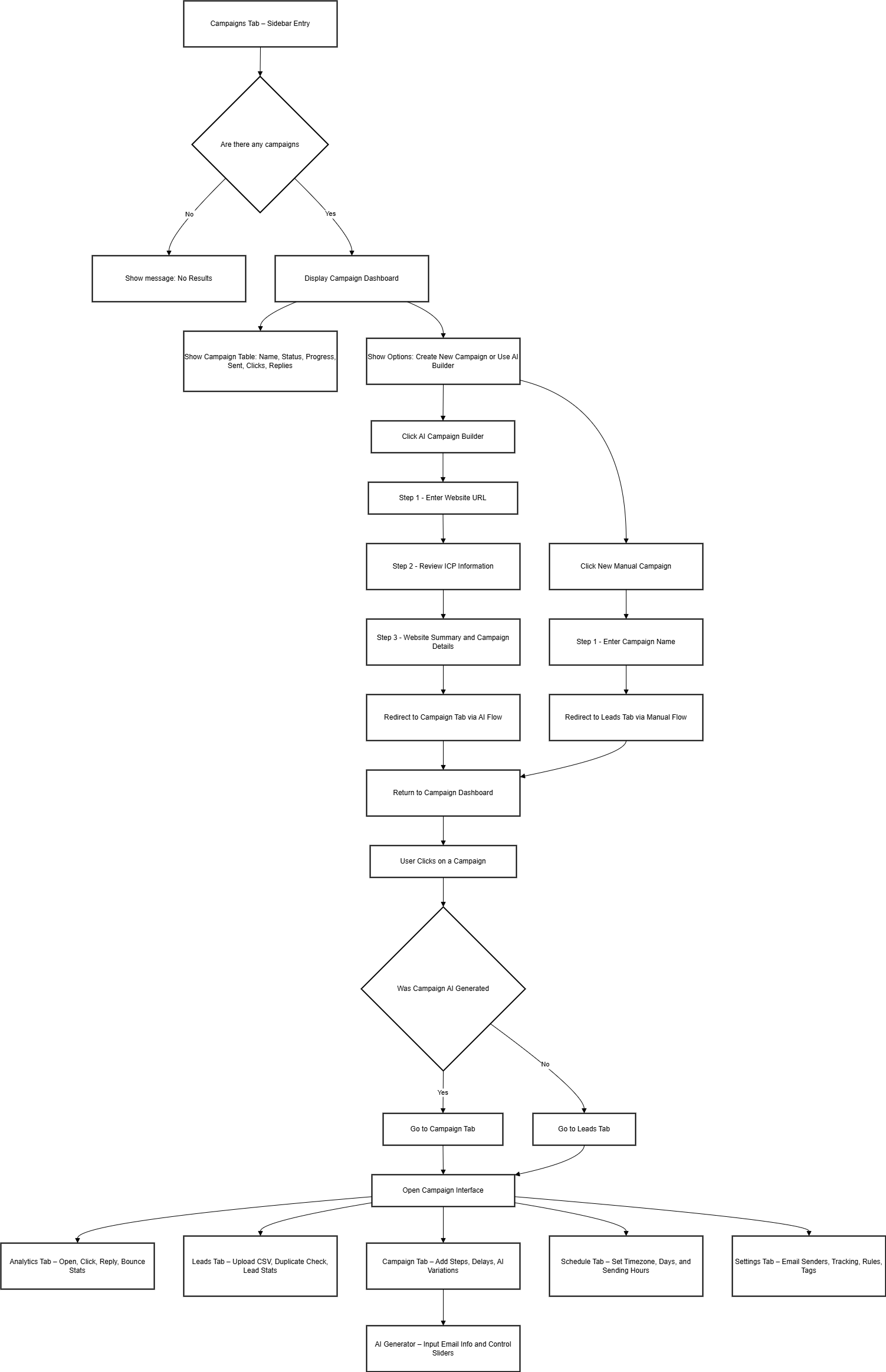
### Entry: Campaigns Tab → Click on Any Campaign

When a user clicks on an existing campaign, the system routes them based on the **campaign type**:

<table id="bkmrk-campaign-type-redire"><tbody><tr><th>Campaign Type</th><th>Redirects To</th></tr><tr><td>AI Campaign</td><td>Campaign Tab</td></tr><tr><td>Manual Campaign</td><td>Leads Tab

</td></tr></tbody></table>

Once inside a campaign, users are presented with a structured interface that includes several functional tabs. These tabs form the control center for managing the lifecycle of a cold email campaign from creation to tracking outcomes.

<div id="bkmrk-">---

</div>## Campaign Dashboard – Tab Overview

Each campaign consists of the following five core tabs:

<table id="bkmrk-tab-name-purpose-ana"><tbody><tr><td>Tab Name</td><td>Purpose</td></tr><tr><td>Analytics</td><td>Visualizes campaign performance and response metrics</td></tr><tr><td>Leads</td><td>Interface to upload, manage, and monitor lead recipients</td></tr><tr><td>Campaign</td><td>The main editor for configuring email steps and sequences</td></tr><tr><td>Schedule</td><td>Controls campaign launch timing, time zone, and delivery schedule</td></tr><tr><td>Settings</td><td>Technical and safety configurations like bounce rules, sender logic</td></tr></tbody></table>

[![image.png](https://internal-docs.parakeet.io/uploads/images/gallery/2025-06/scaled-1680-/HPH16IbIwT2VnJGa-image.png)](https://internal-docs.parakeet.io/uploads/images/gallery/2025-06/HPH16IbIwT2VnJGa-image.png)

<div id="bkmrk--2">---

</div>## Campaign Tab – Email Sequence Builder

This is the centerpiece for campaign setup. It allows:

- Adding **unlimited steps** in the email sequence.
- Each step has configurable delays (e.g., *"Send Step 2 after 3 days"*).
- Drafting subject lines and content for each step.
- Option to personalize with variables (e.g., {{first\_name}}, {{company}}).
- Rich text editor for formatting.

[![image.png](https://internal-docs.parakeet.io/uploads/images/gallery/2025-06/scaled-1680-/2ERry4DkL1VW1AHZ-image.png)](https://internal-docs.parakeet.io/uploads/images/gallery/2025-06/2ERry4DkL1VW1AHZ-image.png)

### AI Variation Generator

An optional tool available inside the Campaign tab that enhances email copy using AI.

**Step 1: Input Requirements**

- Product or service description
- Target audience details
- Pain points being addressed
- Value proposition
- Email subject line

[![image.png](https://internal-docs.parakeet.io/uploads/images/gallery/2025-06/scaled-1680-/ejsrABIhj68oOtM2-image.png)](https://internal-docs.parakeet.io/uploads/images/gallery/2025-06/ejsrABIhj68oOtM2-image.png)

**Step 2: Control Sliders**

- **Creativity**: Conservative to Creative
- **Urgency**: Relaxed to Urgent
- **Tone**: Formal to Casual
- **Style**: Professional to Conversational

[![image.png](https://internal-docs.parakeet.io/uploads/images/gallery/2025-06/scaled-1680-/lhTRenfTkpprA6hN-image.png)](https://internal-docs.parakeet.io/uploads/images/gallery/2025-06/lhTRenfTkpprA6hN-image.png)

AI will return multiple copy variations that the user can preview, edit, and insert.

<div id="bkmrk--6">---

</div>## Leads Tab – Uploading and Managing Recipients

The Leads tab is used to define the recipients for your campaign.

- Upload a list of email leads using a CSV file.
- Drag &amp; drop file support included.

### Lead Duplication Control

- **Checkbox**: `Prevent duplicate leads across all campaigns`
- When checked, the system checks for any existing lead email across all other campaigns.
- Duplicate leads will be skipped during upload.

### Lead Metrics Displayed

- **Total leads uploaded**
- **Sequence started**
- **Unsubscribed**
- **Bounced**
- **Sequence completed**

[![image.png](https://internal-docs.parakeet.io/uploads/images/gallery/2025-06/scaled-1680-/lzgizldJcN1jcJzg-image.png)](https://internal-docs.parakeet.io/uploads/images/gallery/2025-06/lzgizldJcN1jcJzg-image.png)

[![image.png](https://internal-docs.parakeet.io/uploads/images/gallery/2025-06/scaled-1680-/pEYr7TbaczrGGAe5-image.png)](https://internal-docs.parakeet.io/uploads/images/gallery/2025-06/pEYr7TbaczrGGAe5-image.png)

[![image.png](https://internal-docs.parakeet.io/uploads/images/gallery/2025-06/scaled-1680-/psl50rYmAiq8CSoK-image.png)](https://internal-docs.parakeet.io/uploads/images/gallery/2025-06/psl50rYmAiq8CSoK-image.png)

### Lead Management

- View and manage uploaded leads
- Search, sort, and filter leads
- View delivery status for each contact

[![image.png](https://internal-docs.parakeet.io/uploads/images/gallery/2025-06/scaled-1680-/AooXqhYRmBG0wGs7-image.png)](https://internal-docs.parakeet.io/uploads/images/gallery/2025-06/AooXqhYRmBG0wGs7-image.png)

<div id="bkmrk--11">---

</div>## Schedule Tab – Timing &amp; Delivery

Defines when and how emails are sent.

- **Campaign Start Date**: Set a delay to launch later.
- **Time zone**: Default is `America/New York (EDT)`, but can be changed.
- **Sending Days**: Choose which weekdays to send emails (default: Mon–Fri).
- **Sending Hours**: Default window is 9 AM–5 PM. Fully customizable.

[![image.png](https://internal-docs.parakeet.io/uploads/images/gallery/2025-06/scaled-1680-/Roj4V9yC5z7bFjnm-image.png)](https://internal-docs.parakeet.io/uploads/images/gallery/2025-06/Roj4V9yC5z7bFjnm-image.png)

Emails will only be sent within the defined hours on active days.

<div id="bkmrk--13">---

</div>## Analytics Tab – Performance Metrics

Gives a detailed view of how the campaign is performing.

- **Open Rate**: Percentage of recipients who opened the email.
- **Click Rate**: Percentage of recipients who clicked a link.
- **Reply Rate**: Percentage of replies received.
- **Bounce Rate**: Emails that were undeliverable.
- **Unsubscribed**: Number of users who opted out.

Graphs, bar charts, and tables are used to visualize trends.

[![image.png](https://internal-docs.parakeet.io/uploads/images/gallery/2025-06/scaled-1680-/p552FwDBjAw6hDvR-image.png)](https://internal-docs.parakeet.io/uploads/images/gallery/2025-06/p552FwDBjAw6hDvR-image.png)

<div id="bkmrk--15">---

</div>[![image.png](https://internal-docs.parakeet.io/uploads/images/gallery/2025-06/scaled-1680-/7y4LLQWdNprhBqpl-image.png)](https://internal-docs.parakeet.io/uploads/images/gallery/2025-06/7y4LLQWdNprhBqpl-image.png)

## Settings Tab – Technical Controls

This section manages all advanced configurations for a campaign.

[![image.png](https://internal-docs.parakeet.io/uploads/images/gallery/2025-06/scaled-1680-/1zWdpcQWuW9MOT2b-image.png)](https://internal-docs.parakeet.io/uploads/images/gallery/2025-06/1zWdpcQWuW9MOT2b-image.png)

### Accounts To Use

- Select one or more connected email addresses to send emails from.

### Stop Sending Emails On Reply

- When enabled, stops all future steps if a reply is received from the lead.

### Open Tracking

- Track whether recipients opened the email.

### Delivery Optimization

- Choose to send emails in text-only format (HTML fallback).

### Use Signatures From Gmail

- When enabled, uses the sender’s Gmail signature if connected via Google OAuth.

### Combined Daily Limit

- Maximum number of emails sent per day across all selected sending accounts.

### Custom Tags

- Tag the campaign with custom labels for internal filtering and reporting.

### Sending Pattern

- **Time Gap Between Emails**:
    
    
    - Minimum Time (in minutes)
    - Random Additional Time (in minutes)
- **Optional Features**:
    
    
    - Prioritize new leads over follow-ups
    - Stop campaign for a company on reply
    - Stop sending on auto-reply
    - Click tracking
    - Insert unsubscribe link header

### CC

- Add CC addresses (comma-separated) for receiving a copy of each campaign email.

<div id="bkmrk--18">---

</div>## Routing Logic Summary

<table id="bkmrk-action-user-lands-on"><tbody><tr><td>Action</td><td>User Lands On</td></tr><tr><td>Click on AI-generated campaign</td><td>Campaign tab</td></tr><tr><td>Click on manually created campaign</td><td>Leads tab</td></tr><tr><td>View existing campaigns</td><td>Campaign summary dashboard</td></tr><tr><td>Create new campaign (manual)</td><td>Starts from campaign naming → Leads tab</td></tr><tr><td>Create new AI campaign</td><td>Follows website → ICP → campaign builder flow</td></tr></tbody></table>

# Campaign page (overview)

## Campaigns Module – Overview Page

This is the **default landing page** when a user clicks the **Campaigns tab** from the sidebar.

### Entry Behavior

- **No Campaigns Present**  
    If no campaigns have been created yet, the interface displays an empty state with the message:  
    `No campaigns available yet. Start by creating one.`
    
    [![image.png](https://internal-docs.parakeet.io/uploads/images/gallery/2025-06/scaled-1680-/emBKmGt8tfrClZaq-image.png)](https://internal-docs.parakeet.io/uploads/images/gallery/2025-06/emBKmGt8tfrClZaq-image.png)
- **One or More Campaigns Present**  
    The dashboard displays a list of all campaigns (AI-generated or manually created) associated with the workspace. Campaigns are listed in chronological order and include essential metrics and controls.
    
    [![image.png](https://internal-docs.parakeet.io/uploads/images/gallery/2025-06/scaled-1680-/YdJniVLxK2nznRfX-image.png)](https://internal-docs.parakeet.io/uploads/images/gallery/2025-06/YdJniVLxK2nznRfX-image.png)

---

### Primary Actions Available

Users can perform the following top-level actions from the Campaigns overview:

- **New Campaign**  
    Initiates the manual campaign creation process.
- **AI Campaign Builder**  
    Launches the AI-powered campaign creation flow using website input and ICP analysis.

---

### Campaign Table – Data Columns

Each campaign listed includes the following columns:

<div class="_tableContainer_16hzy_1" id="bkmrk-column-name-descript"><div class="_tableWrapper_16hzy_14 group flex w-fit flex-col-reverse" tabindex="-1"><table class="w-fit min-w-(--thread-content-width)" data-end="2654" data-start="1277"><thead data-end="1374" data-start="1277"><tr data-end="1374" data-start="1277"><th data-col-size="sm" data-end="1295" data-start="1277">Column Name</th><th data-col-size="md" data-end="1374" data-start="1295">Description</th></tr></thead><tbody data-end="2654" data-start="1474"><tr data-end="1572" data-start="1474"><td data-col-size="sm" data-end="1496" data-start="1474">**Campaign Name**</td><td data-col-size="md" data-end="1572" data-start="1496">User-defined name of the campaign.</td></tr><tr data-end="1670" data-start="1573"><td data-col-size="sm" data-end="1595" data-start="1573">**Status**</td><td data-col-size="md" data-end="1670" data-start="1595">Indicates state: Active, Paused, Completed.</td></tr><tr data-end="1768" data-start="1671"><td data-col-size="sm" data-end="1693" data-start="1671">**Progress**</td><td data-col-size="md" data-end="1768" data-start="1693">Visual indicator or numeric progress based on email sequence activity.</td></tr><tr data-end="1866" data-start="1769"><td data-col-size="sm" data-end="1791" data-start="1769">**Emails Sent**</td><td data-col-size="md" data-end="1866" data-start="1791">Total number of emails sent for this campaign.</td></tr><tr data-end="1964" data-start="1867"><td data-col-size="sm" data-end="1889" data-start="1867">**Clicks**</td><td data-col-size="md" data-end="1964" data-start="1889">Number of users who clicked a link in the campaign emails.</td></tr><tr data-end="2062" data-start="1965"><td data-col-size="sm" data-end="1987" data-start="1965">**Replies**</td><td data-col-size="md" data-end="2062" data-start="1987">Number of replies received, shown as: `X replies of Y sent`.</td></tr><tr data-end="2160" data-start="2063"><td data-col-size="sm" data-end="2085" data-start="2063">**Actions**</td><td data-col-size="md" data-end="2160" data-start="2085">Start, Stop, or Pause the campaign.</td></tr><tr data-end="2258" data-start="2161"><td data-col-size="sm" data-end="2183" data-start="2161">**Analytics Button**</td><td data-col-size="md" data-end="2258" data-start="2183">Opens the **Analytics** tab for this specific campaign.</td></tr><tr data-end="2357" data-start="2259"><td data-col-size="sm" data-end="2281" data-start="2259">**⋯ Menu (More)**</td><td data-col-size="md" data-end="2357" data-start="2281">Dropdown menu offering:</td></tr><tr data-end="2456" data-start="2358"><td data-col-size="sm" data-end="2379" data-start="2358"> </td><td data-col-size="md" data-end="2456" data-start="2379">- **Edit**: Modify campaign structure</td></tr><tr data-end="2555" data-start="2457"><td data-col-size="sm" data-end="2478" data-start="2457"> </td><td data-col-size="md" data-end="2555" data-start="2478">- **Duplicate**: Clone the campaign</td></tr><tr data-end="2654" data-start="2556"><td data-col-size="sm" data-end="2577" data-start="2556"> </td><td data-col-size="md" data-end="2654" data-start="2577">- **Delete**: Permanently remove it</td></tr></tbody></table>

<div class="sticky end-(--thread-content-margin) h-0 self-end select-none"><div class="absolute end-0 flex items-end"><span class="" data-state="closed"><button class="bg-token-bg-primary hover:bg-token-bg-tertiary text-token-text-secondary my-1 rounded-sm p-1 transition-opacity group-[:not(:hover):not(:focus-within)]:pointer-events-none group-[:not(:hover):not(:focus-within)]:opacity-0"><svg class="icon" fill="currentColor" height="20" viewbox="0 0 20 20" width="20" xmlns="http://www.w3.org/2000/svg"><path d="M12.668 10.667C12.668 9.95614 12.668 9.46258 12.6367 9.0791C12.6137 8.79732 12.5758 8.60761 12.5244 8.46387L12.4688 8.33399C12.3148 8.03193 12.0803 7.77885 11.793 7.60254L11.666 7.53125C11.508 7.45087 11.2963 7.39395 10.9209 7.36328C10.5374 7.33197 10.0439 7.33203 9.33301 7.33203H6.5C5.78896 7.33203 5.29563 7.33195 4.91211 7.36328C4.63016 7.38632 4.44065 7.42413 4.29688 7.47559L4.16699 7.53125C3.86488 7.68518 3.61186 7.9196 3.43555 8.20703L3.36524 8.33399C3.28478 8.49198 3.22795 8.70352 3.19727 9.0791C3.16595 9.46259 3.16504 9.95611 3.16504 10.667V13.5C3.16504 14.211 3.16593 14.7044 3.19727 15.0879C3.22797 15.4636 3.28473 15.675 3.36524 15.833L3.43555 15.959C3.61186 16.2466 3.86474 16.4807 4.16699 16.6348L4.29688 16.6914C4.44063 16.7428 4.63025 16.7797 4.91211 16.8027C5.29563 16.8341 5.78896 16.835 6.5 16.835H9.33301C10.0439 16.835 10.5374 16.8341 10.9209 16.8027C11.2965 16.772 11.508 16.7152 11.666 16.6348L11.793 16.5645C12.0804 16.3881 12.3148 16.1351 12.4688 15.833L12.5244 15.7031C12.5759 15.5594 12.6137 15.3698 12.6367 15.0879C12.6681 14.7044 12.668 14.211 12.668 13.5V10.667ZM13.998 12.665C14.4528 12.6634 14.8011 12.6602 15.0879 12.6367C15.4635 12.606 15.675 12.5492 15.833 12.4688L15.959 12.3975C16.2466 12.2211 16.4808 11.9682 16.6348 11.666L16.6914 11.5361C16.7428 11.3924 16.7797 11.2026 16.8027 10.9209C16.8341 10.5374 16.835 10.0439 16.835 9.33301V6.5C16.835 5.78896 16.8341 5.29563 16.8027 4.91211C16.7797 4.63025 16.7428 4.44063 16.6914 4.29688L16.6348 4.16699C16.4807 3.86474 16.2466 3.61186 15.959 3.43555L15.833 3.36524C15.675 3.28473 15.4636 3.22797 15.0879 3.19727C14.7044 3.16593 14.211 3.16504 13.5 3.16504H10.667C9.9561 3.16504 9.46259 3.16595 9.0791 3.19727C8.79739 3.22028 8.6076 3.2572 8.46387 3.30859L8.33399 3.36524C8.03176 3.51923 7.77886 3.75343 7.60254 4.04102L7.53125 4.16699C7.4508 4.32498 7.39397 4.53655 7.36328 4.91211C7.33985 5.19893 7.33562 5.54719 7.33399 6.00195H9.33301C10.022 6.00195 10.5791 6.00131 11.0293 6.03809C11.4873 6.07551 11.8937 6.15471 12.2705 6.34668L12.4883 6.46875C12.984 6.7728 13.3878 7.20854 13.6533 7.72949L13.7197 7.87207C13.8642 8.20859 13.9292 8.56974 13.9619 8.9707C13.9987 9.42092 13.998 9.97799 13.998 10.667V12.665ZM18.165 9.33301C18.165 10.022 18.1657 10.5791 18.1289 11.0293C18.0961 11.4302 18.0311 11.7914 17.8867 12.1279L17.8203 12.2705C17.5549 12.7914 17.1509 13.2272 16.6553 13.5313L16.4365 13.6533C16.0599 13.8452 15.6541 13.9245 15.1963 13.9619C14.8593 13.9895 14.4624 13.9935 13.9951 13.9951C13.9935 14.4624 13.9895 14.8593 13.9619 15.1963C13.9292 15.597 13.864 15.9576 13.7197 16.2939L13.6533 16.4365C13.3878 16.9576 12.9841 17.3941 12.4883 17.6982L12.2705 17.8203C11.8937 18.0123 11.4873 18.0915 11.0293 18.1289C10.5791 18.1657 10.022 18.165 9.33301 18.165H6.5C5.81091 18.165 5.25395 18.1657 4.80371 18.1289C4.40306 18.0962 4.04235 18.031 3.70606 17.8867L3.56348 17.8203C3.04244 17.5548 2.60585 17.151 2.30176 16.6553L2.17969 16.4365C1.98788 16.0599 1.90851 15.6541 1.87109 15.1963C1.83431 14.746 1.83496 14.1891 1.83496 13.5V10.667C1.83496 9.978 1.83432 9.42091 1.87109 8.9707C1.90851 8.5127 1.98772 8.10625 2.17969 7.72949L2.30176 7.51172C2.60586 7.0159 3.04236 6.6122 3.56348 6.34668L3.70606 6.28027C4.04237 6.136 4.40303 6.07083 4.80371 6.03809C5.14051 6.01057 5.53708 6.00551 6.00391 6.00391C6.00551 5.53708 6.01057 5.14051 6.03809 4.80371C6.0755 4.34588 6.15483 3.94012 6.34668 3.56348L6.46875 3.34473C6.77282 2.84912 7.20856 2.44514 7.72949 2.17969L7.87207 2.11328C8.20855 1.96886 8.56979 1.90385 8.9707 1.87109C9.42091 1.83432 9.978 1.83496 10.667 1.83496H13.5C14.1891 1.83496 14.746 1.83431 15.1963 1.87109C15.6541 1.90851 16.0599 1.98788 16.4365 2.17969L16.6553 2.30176C17.151 2.60585 17.5548 3.04244 17.8203 3.56348L17.8867 3.70606C18.031 4.04235 18.0962 4.40306 18.1289 4.80371C18.1657 5.25395 18.165 5.81091 18.165 6.5V9.33301Z"></path></svg></button></span></div></div></div></div>

# Campaign flow

<div drawio-diagram="105"><img src="https://internal-docs.parakeet.io/uploads/images/drawio/2025-06/BUvoMfm3arD1A1CQ-drawing-3-1750323436.png" alt=""/></div>

# ALL flows in detail

<div drawio-diagram="109"><img src="https://internal-docs.parakeet.io/uploads/images/drawio/2025-06/KNTJrNlswiemgZ9i-drawing-3-1750325147.png" alt=""/></div>